Book Free Demo
Works With Hikvision

Hikvision Cloud VMS — The Modern iVMS-4200 Alternative

Tentovision is a cloud-based VMS and a direct iVMS-4200 alternative that works with your existing Hikvision cameras over RTSP and ONVIF — no dedicated Windows PC, no port forwarding, no hardware to replace. Keep your Hikvision DS-2CD and DS-2DE cameras exactly where they are; swap only the software managing them. Cloud backup, browser and mobile access, camera health monitoring, and 20+ AI analytics on top of the Hikvision hardware you already own.

50+
Hikvision models supported
5 min
Average setup time
Replaces
iVMS-4200 & Hik-Connect
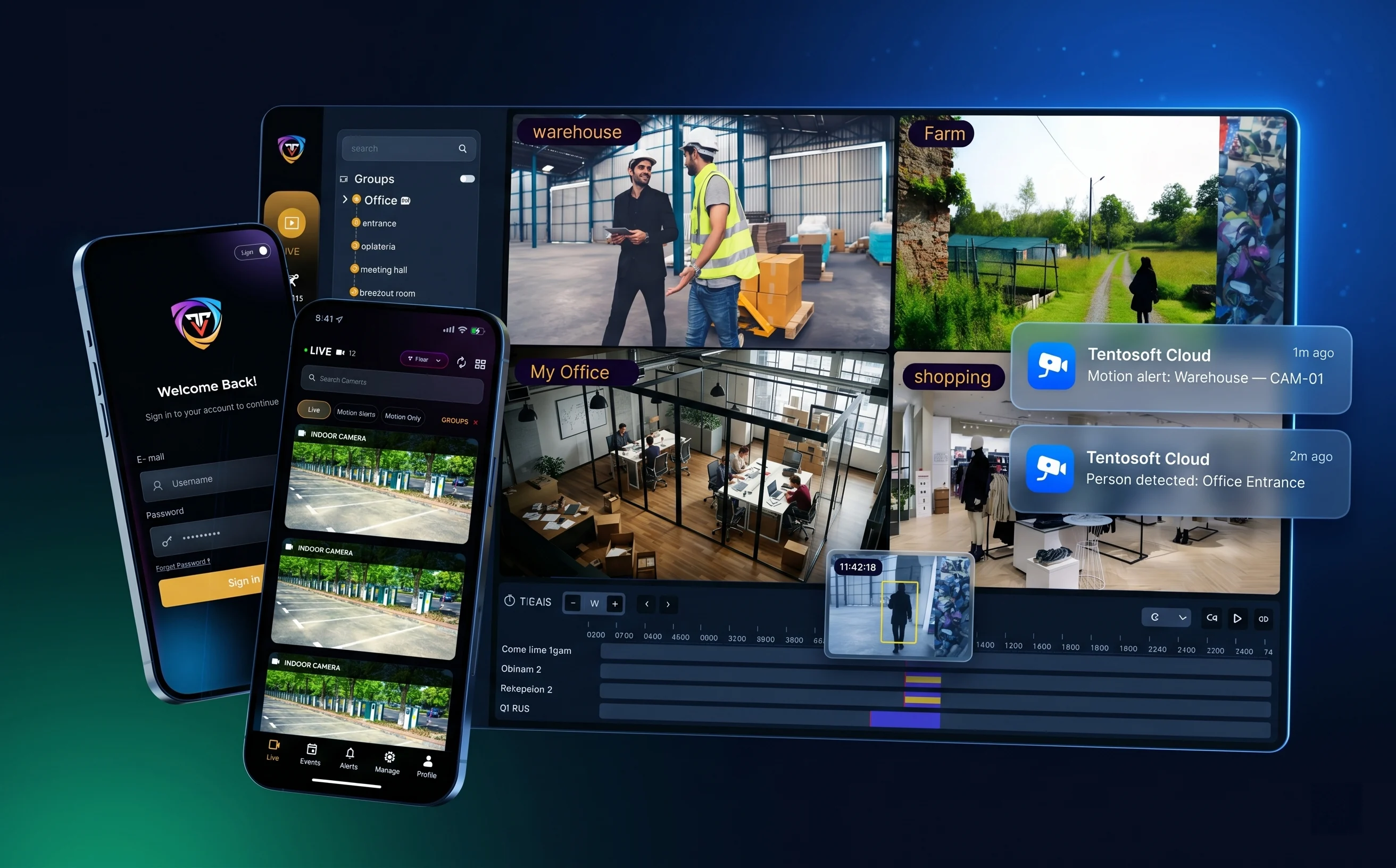
Hero image — Tentovision dashboard with Hikvision feeds Tentovision cloud VMS dashboard showing multiple Hikvision camera feeds with live monitoring, AI analytics overlays, and remote access from browser and mobile
Why switch

Why Hikvision users switch from iVMS-4200 to Tentovision

iVMS-4200 is capable software for managing a single-brand, single-site Hikvision deployment from one Windows machine. The problem is that most modern installations have outgrown those boundaries — as soon as a deployment spans several buildings, mixes camera brands, or falls under a compliance regime that expects offsite footage retention, the gaps below start to bite.

🔒

Locked to Hikvision hardware

iVMS-4200 only manages Hikvision devices. Add a CP Plus camera at a new branch or inherit a Dahua install, and it can no longer give you one pane of glass. After India's BIS mandate reshaped procurement, multi-brand fleets are the norm — and a Hikvision-only client becomes a liability.

Tentovision fix: brand-agnostic ingest of Hikvision, CP Plus, Dahua, Axis, and any ONVIF/RTSP camera into one dashboard.
💾

No cloud recording

iVMS-4200 records only to local NVRs, DVRs, or the host PC. There's no offsite backup. If an NVR is stolen, burned, flooded, or its drive fails, that footage is gone permanently — usually right when you need it as evidence.

Tentovision fix: AES-256 encrypted cloud recording layered over your existing Hikvision NVR, with a tamper-proof copy offsite on Microsoft Azure.
🌐

Remote access requires port forwarding

To check cameras off-site, iVMS-4200 needs port forwarding through your router or Hik-Connect's P2P — both exposing the network to security risks and complicating IT policy. Most enterprise CISOs ban this configuration.

Tentovision fix: outbound-only connection (HTTPS 443), zero inbound ports exposed, role-based access for multiple users across sites.
Cloud storage

Add Cloud Storage to Your Hikvision Cameras — No NVR Replacement

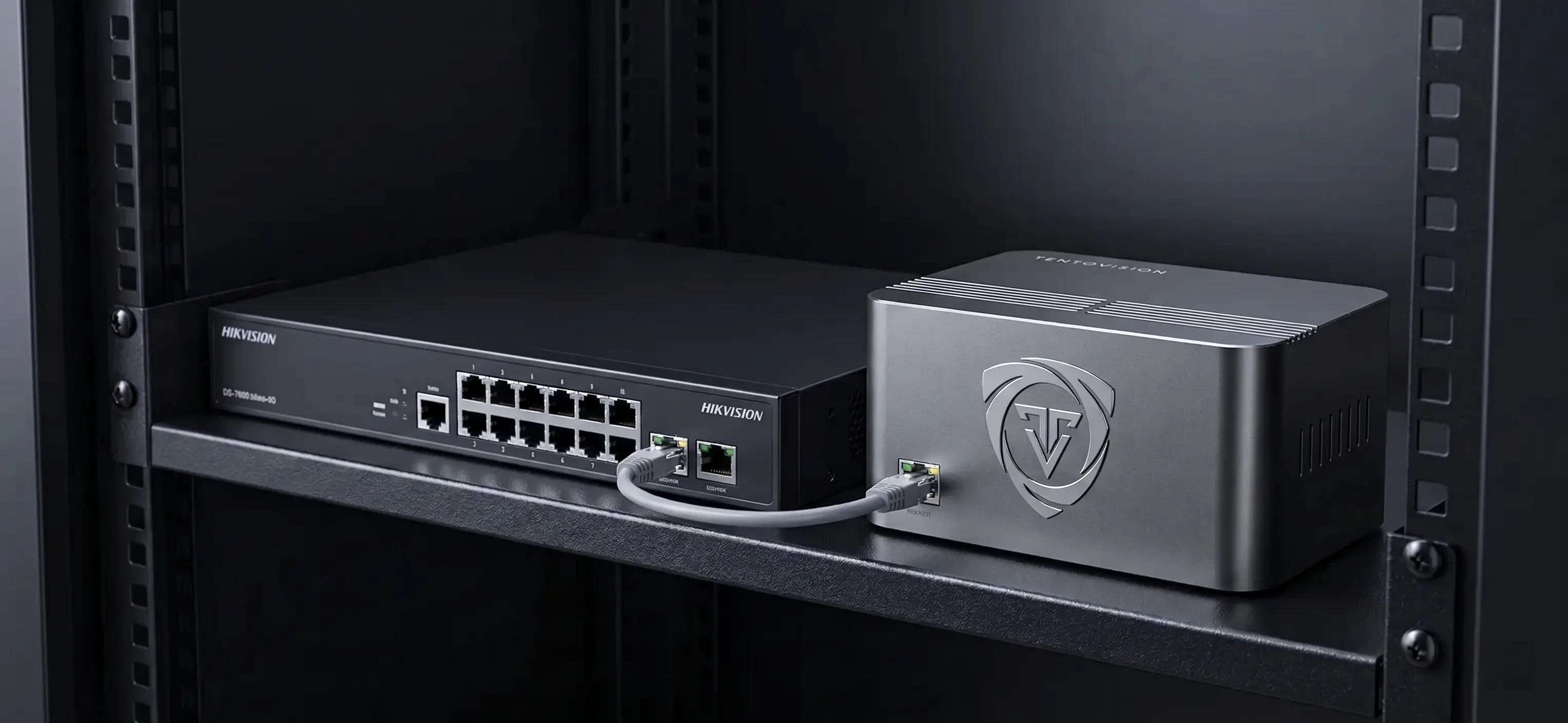
The Tentovision Cloud Adapter connects directly to your existing Hikvision cameras and to DS-7600, DS-7700, and DS-8600 series NVRs over the same network — no rip-and-replace. It mirrors the streams Hikvision is already producing to the cloud, so your local NVR keeps doing its job while a second copy is secured offsite.

  • AES-256 encrypted, Microsoft Azure-hosted cloud recording
  • Flexible retention from 7 days to 10 years
  • Onboard SSD buffers footage when the internet drops, then auto-uploads the backlog
  • Continuous or motion/event-based cloud recording, set per Hikvision channel
  • Runs alongside your Hikvision NVR — no NVR replacement needed

Channel mapping is direct: a DS-7608 NVR's eight channels appear as eight cloud streams, so you choose exactly which Hikvision cameras get offsite backup and at what retention. To keep upload bandwidth predictable, the Cloud Adapter sends the camera sub-stream to the cloud while the main stream continues recording locally on the NVR.

Explore CCTV cloud storage →
Image — Hikvision camera + Cloud Adapter → encrypted Azure cloud storage diagram Architecture diagram showing Hikvision cameras connected to Tentovision Cloud Adapter, streaming encrypted footage to Microsoft Azure cloud storage with local NVR continuing to record
Remote viewing

Access Your Hikvision Cameras Remotely — Without Hik-Connect or Port Forwarding

Hik-Connect works for one user checking one site from a phone, but it scales poorly and carries security baggage. Tentovision is a Hik-Connect alternative built for organisations rather than individual devices.

  • Secure outbound connection — no inbound ports exposed, unlike Hik-Connect's P2P / port forwarding
  • WebRTC low-latency live streaming in any browser or the mobile app (~0.5s latency)
  • Multi-site dashboard vs Hik-Connect's single-device view
  • Role-based access permissions per user and location
  • Per-channel access — map individual NVR channels (e.g. Hikvision DS-7616 channels 1–16) to specific users

Because viewing runs on the camera sub-stream by default, remote playback stays smooth even on the constrained upload bandwidth common at branch sites with limited upload bandwidth, while supervisors still get full-resolution main-stream footage on demand. Mobile push alerts replace Hik-Connect's polling model, so a motion or line-crossing event on a Hikvision DS-2CD camera reaches the right person in seconds — with a full audit trail of who viewed what.

See the wider cloud VMS →
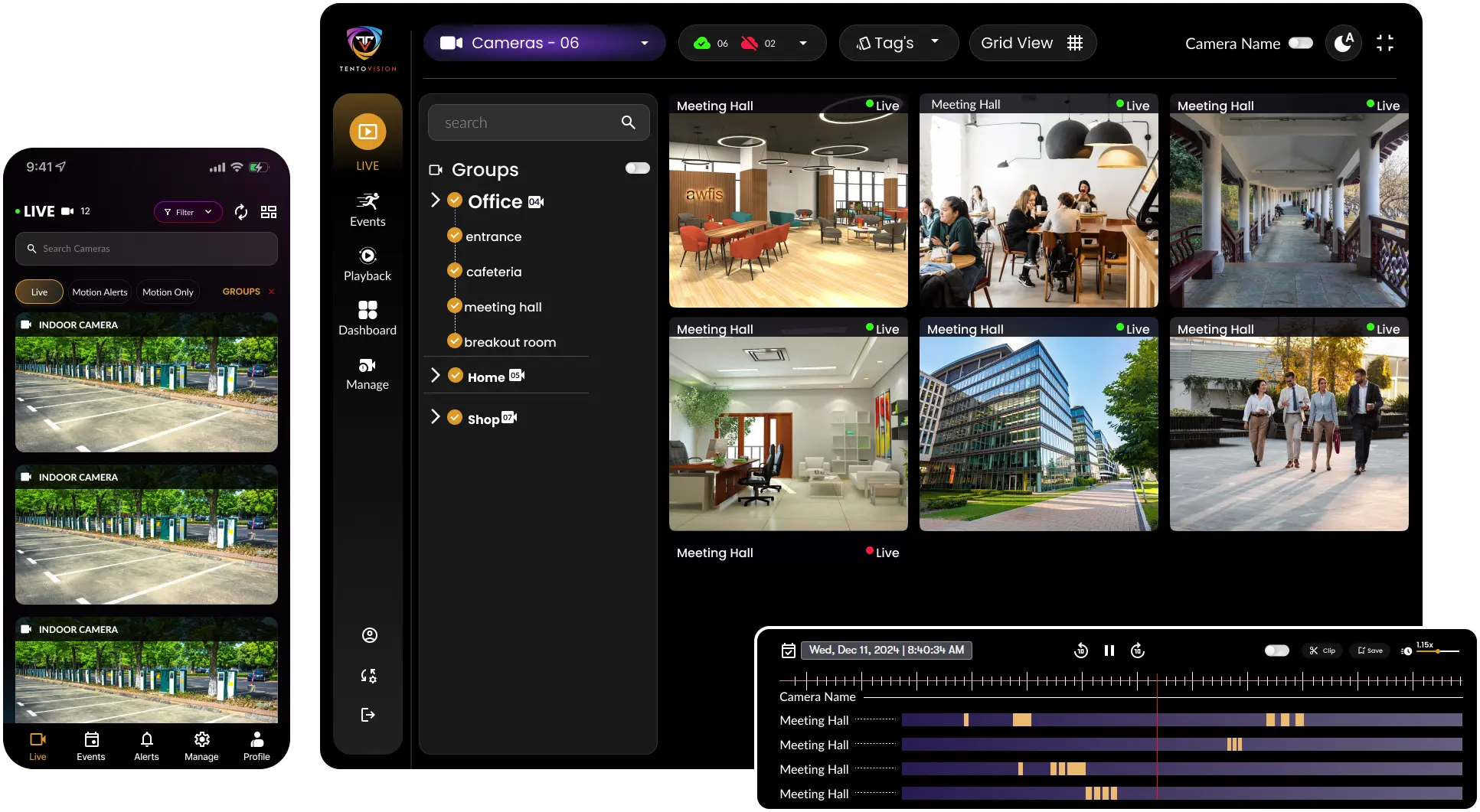
Image — Tentovision multi-site dashboard with Hikvision feeds Tentovision multi-site dashboard displaying Hikvision camera feeds from multiple locations on browser and mobile, with role-based access controls and live alerts
iVMS alternative

iVMS-4200 vs Tentovision: a feature-by-feature comparison

Here's how Tentovision compares to iVMS-4200 feature by feature. This is an honest comparison — iVMS-4200 is free and genuinely capable for the job it was built for, and the table reflects that.

FeatureiVMS-4200Tentovision
Multi-brand camera support✗ Hikvision only✓ 200+ brands
Cloud video recording✓ Azure-hosted
On-premise recording✓ via Hikvision NVR
Hybrid (cloud + local)
AI analytics (ANPR, PPE, People Counting)✗ basic motion only✓ 20+ analytics
Camera health monitoring
Deep Hikvision-native config (line crossing, intrusion detection)✓ StrongVia ONVIF
Fully local / air-gapped operationOn-premise option
Multi-site managementLimited (complex setup)✓ Unlimited sites
Mobile + web browser accessHik-Connect app only✓ Any browser + app
Setup / deployment timeHours (manual config)Under 5 minutes
Pricing modelFree (bundled with hardware)Subscription or perpetual

Read honestly, the table tells you when not to switch as clearly as when to. If you run a single Hikvision-only site, record everything locally on a DS-7600 NVR, never need remote access beyond the occasional Hik-Connect check, and have no appetite for a subscription, then iVMS-4200 is free, stable, and perfectly adequate. The case for an iVMS-4200 alternative appears the moment any of those conditions break: you add a second brand or site, you need offsite backup, your CISO wants the port-forwarding exposure closed, or you want AI analytics on cameras you already own.

Setup guide

How to connect Hikvision cameras to Tentovision (RTSP & ONVIF)

Connecting Hikvision cameras takes about five minutes. The steps below use standard Hikvision addressing — confirm exact paths against your camera's firmware, since some firmware lines vary slightly.

  1. Find the Hikvision camera IP address

    Check the device list in iVMS-4200, or scan the subnet with a tool like Advanced IP Scanner. The Hikvision factory default IP is 192.168.1.64 if the camera has never been configured.

  2. Enable ONVIF on the camera

    In the camera's web interface, go to Configuration → Network → Advanced Settings → Integration Protocol and enable ONVIF. If prompted, create a dedicated ONVIF user — on several Hikvision firmware versions this is separate from the admin account.

  3. Note the RTSP URL

    Hikvision uses a specific stream path on default port 554:

    # Main stream rtsp://username:password@IP:554/Streaming/Channels/101 # Sub-stream rtsp://username:password@IP:554/Streaming/Channels/102
  4. Connect the Cloud Adapter

    Plug the Tentovision Cloud Adapter into the same network switch as your Hikvision cameras or NVR. Power it on — a single blue LED indicates network connectivity.

  5. Pair the adapter

    Scan the QR code on the bottom of the adapter using the Tentovision app to register it to your account. Pairing typically completes in under 60 seconds.

  6. Add cameras

    Use ONVIF auto-discovery to pull cameras in automatically, or enter the RTSP URL manually for any device you'd rather add by hand. Bulk-add supports CSV import for sites with 50+ cameras.

  7. Verify the live feed

    Confirm each live feed appears in the Tentovision dashboard, then set recording mode (continuous, motion, or hybrid) and cloud retention per camera. You're live.

📷 Compatible Hikvision cameras

DS-2CD series (bullet & dome IP), DS-2DE series (PTZ), DS-2DF series (fisheye), DS-2TD series (thermal), and the broader IPC range. 50+ Hikvision models tested and supported.

Deployment

Deploy Tentovision with your Hikvision cameras — cloud, on-premise, or hybrid

Tentovision runs your existing Hikvision fleet three ways, so the deployment matches the site rather than forcing the site to match the software.

☁️

Cloud

Cloud Adapter + cloud storage

Subscription, with no NVR required. The Cloud Adapter pulls your Hikvision camera streams straight to Azure, and there's nothing on site to maintain beyond the adapter. If you've inherited a Hikvision deployment with ageing or failing DVRs, this retires the local recorder entirely.

Best for: businesses wanting zero hardware maintenance and instant multi-site rollout.
🖥️

On-Premise

Edge device + local SSD

One-time cost, running entirely without internet. Video never leaves the building, and your existing Hikvision DS-8600 enterprise NVR keeps recording locally as the system of record while the edge device handles management and analytics.

Best for: sites with data-residency or compliance requirements, or unreliable connectivity.
🔀

Hybrid

Local recording + cloud backup

Your Hikvision NVR handles instant local playback; the Cloud Adapter mirrors a sub-stream copy to the cloud for offsite resilience. You get the responsiveness of local storage with the tamper-proof security of the cloud — the most common choice for multi-site enterprises.

Best for: enterprises wanting local performance without giving up offsite protection.

Mix modes across your estate and manage them together with full multi-site CCTV monitoring.

AI analytics

20+ AI analytics on your existing Hikvision cameras

Your existing Hikvision DS-2CD and DS-2DE cameras can do more than just record. Tentovision applies modern analytics to the streams they already produce — no specialist cameras, no hardware swap. Processing runs in the cloud for cloud and hybrid deployments, or entirely on the edge device where footage must stay on site. Analytics that iVMS-4200 cannot provide at all run here on the same DS-2CD and DS-2DE feeds you are already recording.

🚗

ANPR / License Plate

Read and log vehicle plates at gates, car parks, and loading bays — with watchlist matching.

Vehicle
⛑️

PPE Detection

Flag missing helmets, vests, gloves, masks, goggles, or safety boots on industrial sites.

Safety
👥

People Counting

Automated footfall and occupancy counting across retail, transit, and facility entrances.

Retail
🪪

Face Recognition

Watchlist matching, access verification, and VIP / repeat-visitor identification.

Identity
🔥

Fire & Smoke Detection

Early visual detection of fire and smoke before conventional sensors trigger — including outdoor scenarios.

Safety
🛒

Shoplifting Prevention

Behavioural anomaly alerts at high-risk retail zones — concealment, sweeping, abnormal dwell.

Retail
📊

Crowd Density Analysis

Real-time crowd density heatmaps with safe / critical thresholds for stadiums, transit hubs, events.

Crowd
🚨

Intrusion Detection

Perimeter breach alerts for restricted zones, server rooms, off-hour office areas, R&D labs.

Security
↔️

Line Crossing Detection

Configurable virtual tripwires with direction logic — entry, exit, or both — across any camera view.

Security

Loitering Detection

Alerts when a person remains in a defined zone beyond a configurable time threshold — ATMs, lobbies, restricted areas.

Security
🎒

Object Left Behind

Detects abandoned bags, parcels, or items in public areas — airports, transit hubs, secure zones.

Security
📦

Object Removed / Theft

Detects removal of monitored items — products, equipment, displays — with timestamped clip evidence.

Retail
🚚

Vehicle Classification

Distinguish cars, trucks, motorcycles, bicycles, buses, and pedestrians in traffic and parking feeds.

Vehicle
🚗

ANPR / License Plate

Read and log vehicle plates at gates, car parks, and loading bays — with watchlist matching.

Vehicle
⛑️

PPE Detection

Flag missing helmets, vests, gloves, masks, goggles, or safety boots on industrial sites.

Safety
👥

People Counting

Automated footfall and occupancy counting across retail, transit, and facility entrances.

Retail
🪪

Face Recognition

Watchlist matching, access verification, and VIP / repeat-visitor identification.

Identity
🔥

Fire & Smoke Detection

Early visual detection of fire and smoke before conventional sensors trigger — including outdoor scenarios.

Safety
🛒

Shoplifting Prevention

Behavioural anomaly alerts at high-risk retail zones — concealment, sweeping, abnormal dwell.

Retail
📊

Crowd Density Analysis

Real-time crowd density heatmaps with safe / critical thresholds for stadiums, transit hubs, events.

Crowd
🚨

Intrusion Detection

Perimeter breach alerts for restricted zones, server rooms, off-hour office areas, R&D labs.

Security
↔️

Line Crossing Detection

Configurable virtual tripwires with direction logic — entry, exit, or both — across any camera view.

Security

Loitering Detection

Alerts when a person remains in a defined zone beyond a configurable time threshold — ATMs, lobbies, restricted areas.

Security
🎒

Object Left Behind

Detects abandoned bags, parcels, or items in public areas — airports, transit hubs, secure zones.

Security
📦

Object Removed / Theft

Detects removal of monitored items — products, equipment, displays — with timestamped clip evidence.

Retail
🚚

Vehicle Classification

Distinguish cars, trucks, motorcycles, bicycles, buses, and pedestrians in traffic and parking feeds.

Vehicle
Speed Estimation

Estimate vehicle speed across camera-defined zones — useful for parking lots, industrial yards, campus roads.

Vehicle
🛵

Helmet Detection (Two-Wheelers)

Detect helmetless riders entering campus, factory, or warehouse premises — critical for India compliance.

Safety
↩️

Wrong-Way Detection

Alert when vehicles or people move against the designated flow direction — one-ways, ramps, exits.

Traffic
🚶‍♂️

Queue Length Monitoring

Track queue lengths at counters, checkouts, and entrances — open more lanes before customers walk away.

Retail
🗺️

Heat Maps & Dwell Time

Visualise where people linger across a floor plan — optimise retail layouts, signage, and staff coverage.

Analytics
📈

Demographic Analytics

Estimated age range and gender distribution from anonymised CCTV feeds — for retail planning and footfall insight.

Retail
🚭

Smoking Detection

Detect smoking in restricted zones — factory floors, warehouses, hospitals, fuel stations.

Safety
📱

Phone Usage Detection

Flag mobile phone use in restricted areas — production lines, driver cabs, secure zones, exam halls.

Compliance
🤕

Slip & Fall Detection

Detect persons fallen on the ground and unmoving — alerting staff in healthcare, eldercare, warehouses.

Safety
📏

Social Distancing

Monitor inter-person distancing in queues and shared zones — flexible for health-safety policies.

Safety
🚫

Camera Tampering Detection

Alerts when a camera is blocked, blurred, sprayed, or repositioned — guards against deliberate evasion.

Security
🚦

Traffic Flow Analysis

Vehicle counts, lane occupancy, congestion patterns, and average speed across road segments.

Traffic

Speed Estimation

Estimate vehicle speed across camera-defined zones — useful for parking lots, industrial yards, campus roads.

Vehicle
🛵

Helmet Detection (Two-Wheelers)

Detect helmetless riders entering campus, factory, or warehouse premises — critical for India compliance.

Safety
↩️

Wrong-Way Detection

Alert when vehicles or people move against the designated flow direction — one-ways, ramps, exits.

Traffic
🚶‍♂️

Queue Length Monitoring

Track queue lengths at counters, checkouts, and entrances — open more lanes before customers walk away.

Retail
🗺️

Heat Maps & Dwell Time

Visualise where people linger across a floor plan — optimise retail layouts, signage, and staff coverage.

Analytics
📈

Demographic Analytics

Estimated age range and gender distribution from anonymised CCTV feeds — for retail planning and footfall insight.

Retail
🚭

Smoking Detection

Detect smoking in restricted zones — factory floors, warehouses, hospitals, fuel stations.

Safety
📱

Phone Usage Detection

Flag mobile phone use in restricted areas — production lines, driver cabs, secure zones, exam halls.

Compliance
🤕

Slip & Fall Detection

Detect persons fallen on the ground and unmoving — alerting staff in healthcare, eldercare, warehouses.

Safety
📏

Social Distancing

Monitor inter-person distancing in queues and shared zones — flexible for health-safety policies.

Safety
🚫

Camera Tampering Detection

Alerts when a camera is blocked, blurred, sprayed, or repositioned — guards against deliberate evasion.

Security
🚦

Traffic Flow Analysis

Vehicle counts, lane occupancy, congestion patterns, and average speed across road segments.

Traffic

All 20+ analytics work on the Hikvision cameras you already own — no camera replacement required. Cloud-processed for cloud and hybrid deployments, edge-processed for on-premise sites. Analytics that iVMS-4200 cannot provide at all run here on the same DS-2CD and DS-2DE feeds you are already recording.

FAQ

Frequently asked questions about Tentovision + Hikvision

Yes. Tentovision pulls Hikvision streams over RTSP and ONVIF without taking exclusive control of the camera, so iVMS-4200 can keep running on its Windows PC for local management while Tentovision adds cloud recording and remote access in parallel. Many teams run both during a transition period before fully migrating off iVMS-4200.
No. Hik-Connect and Tentovision can coexist, since they connect to your Hikvision cameras independently. Most users stop opening Hik-Connect once Tentovision's browser and mobile viewing is live, because it removes the port-forwarding exposure that Hik-Connect's P2P model often requires.
Yes. The Cloud Adapter connects to Hikvision NVRs including the DS-7600, DS-7700, and DS-8600 series over your existing network, so you keep local recording on the NVR and add cloud backup on top. There is no need to replace the NVR you bought your Hikvision cameras with.
For a Hikvision DS-2CD camera the main stream is rtsp://username:password@IP:554/Streaming/Channels/101 and the sub-stream is /Streaming/Channels/102, both on default port 554. If you previously used the older /ch1/main/av_stream path, switch to the /Streaming/Channels/ format on modern firmware.
Yes — this is exactly where iVMS-4200 falls short. iVMS-4200 only manages Hikvision hardware, whereas Tentovision is brand-agnostic and ingests Hikvision, CP Plus, Dahua, Axis, and any ONVIF-compliant camera into one dashboard, which is essential for the multi-brand fleets common after India's BIS mandate.
Yes. Hikvision DS-2DE PTZ cameras connect over ONVIF/RTSP like any other model, and Tentovision supports their pan, tilt, and zoom controls from the browser and mobile app — including from the multi-site dashboard, which Hik-Connect's single-device view cannot replicate.
In most cases, yes. Older Hikvision firmware still exposes ONVIF and the standard /Streaming/Channels/101 RTSP path, so the camera connects normally. On some older firmware you must create a separate ONVIF user (distinct from the admin account) before discovery succeeds.
Yes, and this is one of the strongest reasons to move off iVMS-4200. You can retain your compliant Hikvision DS-2CD and DS-2DE cameras, add BIS-registered cameras from other brands, and manage the entire mixed estate on a single Tentovision dashboard — something neither iVMS-4200 nor Hik-Connect supports.
Trademark notice: Hikvision, iVMS-4200, Hik-Connect, DS-2CD, DS-2DE, DS-7600, DS-7700, and DS-8600 are trademarks of Hangzhou Hikvision Digital Technology Co., Ltd. Dahua, Axis, CP Plus and other camera brand names referenced are trademarks of their respective owners. Tentosoft Solutions Private Limited is not affiliated with, endorsed by, or sponsored by Hikvision or any other camera manufacturer mentioned on this page. All product names, logos, and brands are property of their respective owners and used for descriptive interoperability purposes only.
Start free trial

Ready to upgrade your Hikvision cameras?

Try Tentovision with your existing Hikvision fleet — free for 14 days. Tell us your camera count and we'll size the right Cloud Adapter (or virtual deployment) for your setup, typically within 1 business day.

📷

Works with what you own

Hikvision DS-2CD, DS-2DE, DS-7600/7700/8600 NVRs — plus 200+ ONVIF brands. No replacement.

5-minute setup

Plug in the Cloud Adapter, scan the QR, add cameras via RTSP or ONVIF auto-discovery.

🛡️

AES-256 + Azure-hosted

SOC 2 and ISO 27001 aligned data handling. DPDP Act 2023 compliant. Your video stays private.

🇮🇳

India-based team

All onboarding, deployment, and support handled by our India team — in your time zone.

📍 7th Floor, 4/293, RAR Technopolis, OMR, Perungudi, Chennai 600096

Start your free trial

Fill the form — our team responds within 1 business day.

🔒 Your data is never shared with third parties
📞 We respond within 1 business day (IST)
🇮🇳 GST registered · DPDP Act 2023 compliant
Start Free Trial