Book Free Demo
Works With HiFocus

HiFocus CCTV Software & VMS — Cloud, Multi-Brand & AI

Tentovision is a cloud-based VMS for HiFocus cameras that works over ONVIF and RTSP — a modern alternative to HiFocus's local CMS tools that adds cloud recording, AI analytics, and multi-brand support, so you can manage HiFocus cameras and DVRs alongside CP Plus, Hikvision, and Dahua on one platform. HiFocus is one of India's most widely installed CCTV brands, and its own HiFocus CCTV software handles basic local viewing — but Tentovision gives your HiFocus cameras the cloud, multi-site, and AI capabilities that a desktop CMS can't.

ONVIF
HiFocus ONVIF compatible
5 min
Average setup time
Multi-brand
HiFocus + other brands together
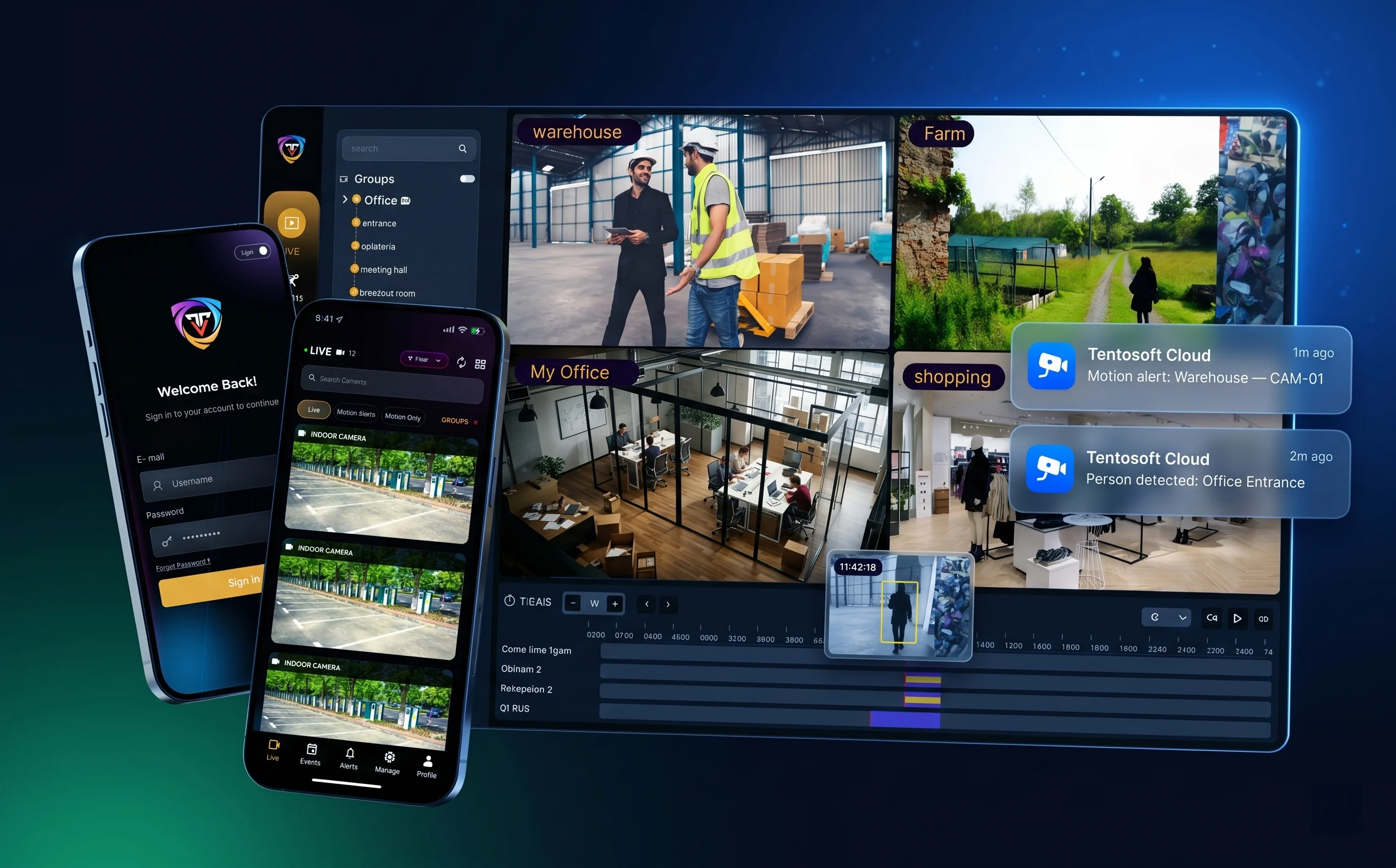
Hero image — Tentovision dashboard with HiFocus + other Indian brand feeds Tentovision cloud VMS dashboard showing HiFocus Elite Series HDCVI camera feeds alongside CP Plus, Hikvision, and Dahua cameras on a single multi-site view, with live monitoring, AI analytics overlays, and browser and mobile access
Why a capable VMS

Why HiFocus cameras need a more capable VMS

HiFocus does provide software — Hf Media Plus, the HiFocus CMS desktop client (also sold as Hifocus Live VMS), and the free HiFocusView viewer. This HiFocus CCTV software handles basic local viewing for a single site. The question for a growing installation isn't whether any software exists — it's whether these basic, local tools fit a modern, multi-site, multi-brand operation.

🖥️

The HiFocus CMS tools are basic, local & single-brand

Hf Media Plus and the HiFocus CMS are desktop tools tied to a Windows PC: single-brand, with no enterprise cloud recording, no AI analytics, no centralised multi-site dashboard, and remote access that leans on P2P or port forwarding. If a HiFocus DVR is stolen or its disk fails, the footage goes with it.

Tentovision adds: cloud recording, AI, and health monitoring over ONVIF/RTSP — no PC chained to a desk.
🧩

HiFocus rarely runs alone

In most Indian installs HiFocus sits beside CP Plus, with legacy Hikvision and Dahua cameras on older sites. A CCTV installer servicing multiple clients routinely juggles three or four brands — and managing each with its own software is an operational headache.

Tentovision unifies them: HiFocus, CP Plus, Sparsh, Hikvision, and Dahua on one dashboard, one login.
Multi-brand management

Managing HiFocus alongside CP Plus, Hikvision, and Dahua cameras

This is the reality in most Indian installations. Manage it with each brand's own software and you're juggling HiFocus CMS, KVMS Pro for CP Plus, iVMS-4200 for Hikvision, and SmartPSS for Dahua — separate logins, no unified view. For a new BIS-era estate you might add Sparsh too.

What Tentovision provides for your HiFocus cameras

The full feature set, regardless of what's underneath:

  • Centralised live view
  • Cloud recording
  • Local recording
  • Playback & search
  • Camera health monitoring
  • AI analytics
  • Multi-site management
  • Mobile & browser access
  • Role-based permissions
  • Secure remote access

One dashboard · every brand

HiFocus Indian
CP Plus Indian
Hikvision Legacy
Dahua Legacy
All managed in one login, one view — plus Sparsh and any ONVIF/RTSP camera.
HiFocus cloud storage

Add cloud storage to your HiFocus cameras — no NVR replacement

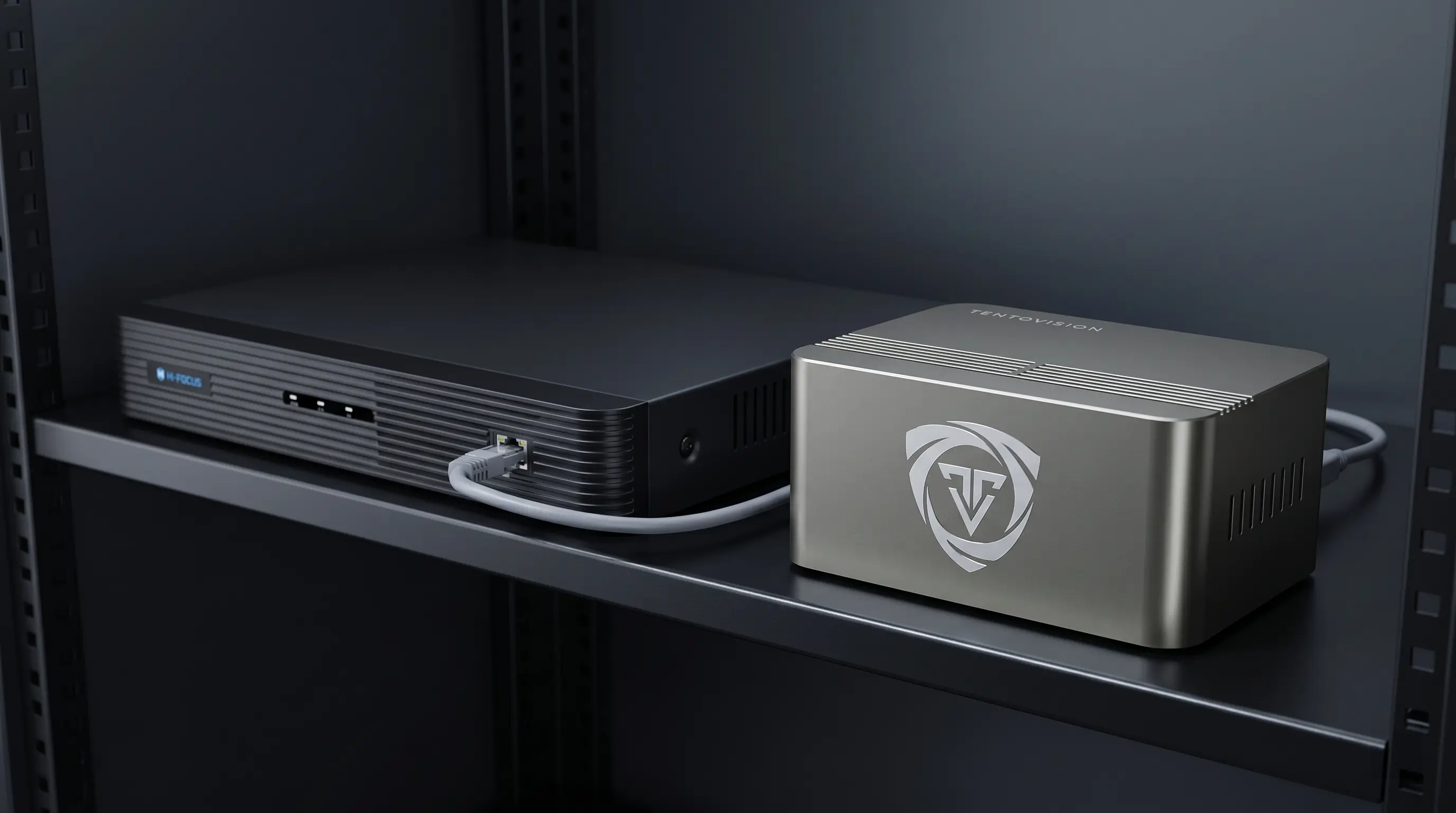
The Tentovision Cloud Adapter connects to your existing HiFocus cameras, DVRs, and XVRs over ONVIF/RTSP and records them to the cloud — no rip-and-replace, and no need to change your recorder.

  • AES-256 encrypted, Microsoft Azure-hosted cloud recording
  • Keep the HiFocus DVR — add an offsite cloud copy on top
  • Footage survives even if the DVR is stolen or its disk fails
  • Onboard SSD buffers footage when the connection drops, then auto-uploads
  • Continuous or motion/event-based cloud recording, set per HiFocus channel

This matters for HiFocus's DVR-heavy installed base. Many small businesses and retail stores in India still run on a single HiFocus DVR — a tempting target for thieves. Cloud backup means the footage exists somewhere else even if the entire recorder walks out the door.

Explore CCTV cloud storage →
Image — HiFocus DVR + Cloud Adapter → encrypted Azure cloud storage diagram TentoVision Cloud Adapter next to a HiFocus DVR connected via ethernet — cloud backup for HiFocus cameras and DVRs
Remote access

Access your HiFocus cameras remotely — from any browser or mobile

HiFocus's CMS and mobile tools reach cameras over P2P or port forwarding. Tentovision gives your HiFocus cameras secure remote access without opening any inbound ports — the connection is outbound and secure, so there's nothing for an attacker to scan.

  • No port forwarding — secure outbound connection only
  • WebRTC low-latency live streaming in any browser or the mobile app (~0.5s latency)
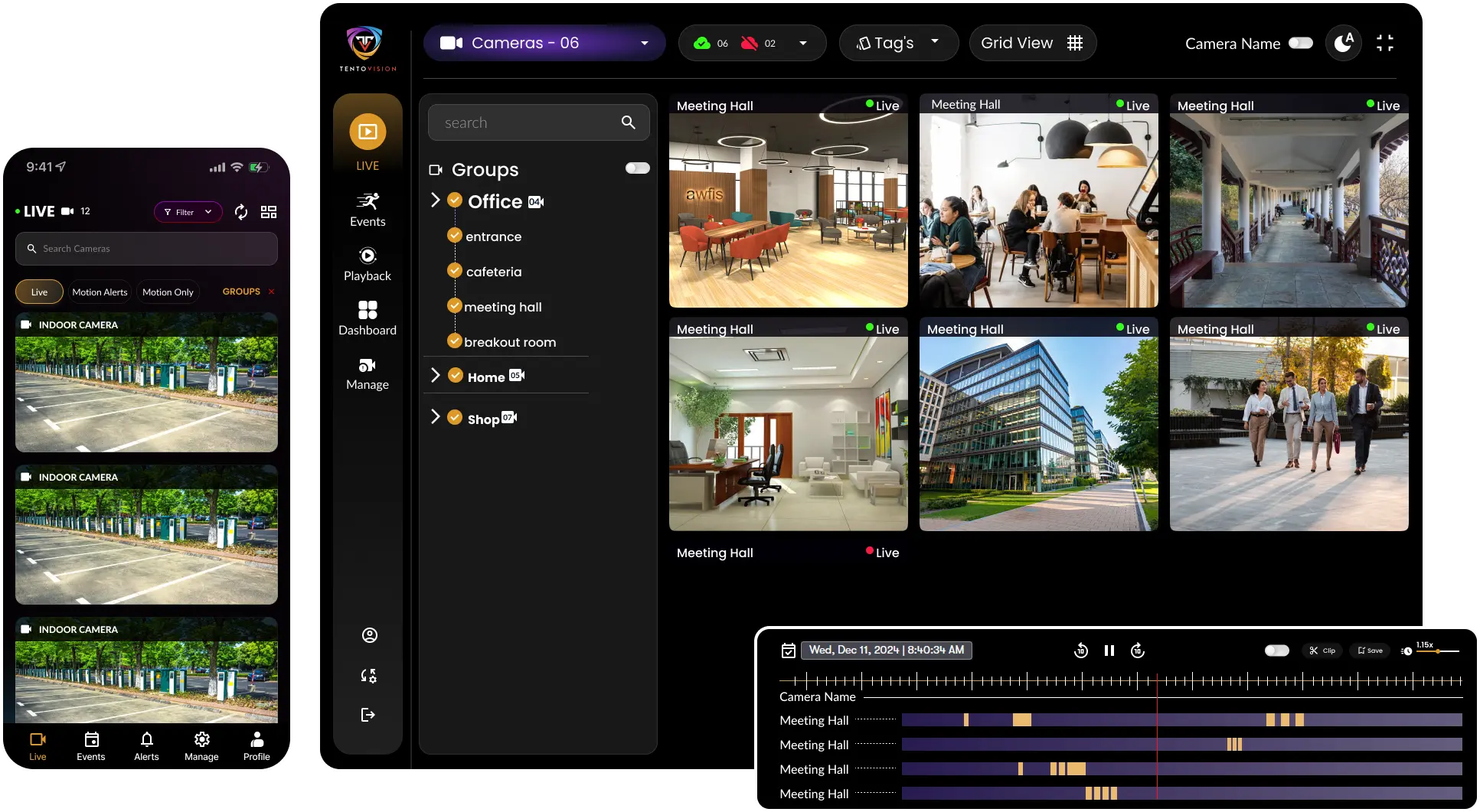
  • Multi-site dashboard across every location and brand
  • Role-based access permissions per user and site
  • Full audit trail of who viewed what and when

For an installer managing several client sites, that single permissioned view replaces a stack of separate apps. Mobile push alerts replace the HiFocus mobile app's polling model, so a motion or line-crossing event on a HiFocus camera reaches the right person in seconds.

See the wider cloud VMS →
Image — Multi-site dashboard with HiFocus, CP Plus & Hikvision feeds in one view Tentovision multi-site dashboard displaying HiFocus cameras alongside CP Plus, Hikvision, and Dahua feeds from multiple Indian client sites, on browser and mobile, with role-based access for installers and end-users
Setup guide

How to connect HiFocus cameras to Tentovision (firmware ID + RTSP/ONVIF setup)

Many HiFocus models use rebranded firmware derived from established platforms, so the RTSP URL format depends on which firmware your specific camera runs. Here's how to identify it — and ONVIF auto-discovery sidesteps the guesswork in most cases.

🔍

Step 1 — Identify your HiFocus firmware

Open the camera's web interface in a browser (http://camera-IP) and look at the design:

Dahua-style UI

Dark theme · "Setup" menu

Use the Dahua RTSP format. This is the most likely match for HiFocus's flagship Elite Series HDCVI line, since HDCVI is a Dahua-derived standard.

Hikvision-style UI

Blue/grey theme · "Configuration" menu

Use the Hikvision RTSP format. Check System → Device Information for a firmware or manufacturer string if you're unsure.

Still unsure? Use ONVIF auto-discovery (Step 3) — it connects regardless of the underlying firmware.

Step 2 — RTSP formats by firmware

Try them in this order — Dahua-style first, because it fits the HDCVI/Elite line most HiFocus installs use:

Dahua-based firmware (try first — Elite / HDCVI)
rtsp://username:password@IP:554/cam/realmonitor?channel=1&subtype=0 // main rtsp://username:password@IP:554/cam/realmonitor?channel=1&subtype=1 // sub
Hikvision-based firmware
rtsp://username:password@IP:554/Streaming/Channels/101 // main rtsp://username:password@IP:554/Streaming/Channels/102 // sub
Generic ONVIF
rtsp://username:password@IP:554/stream1
  1. Enable ONVIF

    In the camera's web interface, enable the ONVIF protocol under the network settings, and create an ONVIF user if prompted. Most HiFocus IP cameras support ONVIF.

  2. Connect the Cloud Adapter, add cameras & verify

    Plug the Tentovision Cloud Adapter into the same network switch, scan its QR code with the app to pair it, then add cameras via ONVIF auto-discovery (recommended) or by entering the RTSP URL manually. Confirm each live feed appears, then set recording mode (continuous, motion, or hybrid) and cloud retention per camera.

📷 Compatible HiFocus devices

Tentovision supports all HiFocus IP cameras, DVRs, and XVRs that provide ONVIF or RTSP access — including the Elite Series HDCVI line and standard IP ranges.

⚠ Troubleshooting
  • "I don't know which firmware my camera uses" — try the Dahua-style format first (it fits the HDCVI/Elite line), then the Hikvision-style format.
  • "Neither RTSP format works" — use ONVIF auto-discovery instead; it's the most reliable route for HiFocus's mixed firmware.
  • "ONVIF isn't available" — check the camera's firmware version under Device Information; older units may need a firmware update for ONVIF support.
Deployment

Deploy Tentovision with your HiFocus cameras — cloud, on-premise, or hybrid

Tentovision runs your HiFocus cameras three ways, so deployment matches the site rather than forcing one model.

☁️

Cloud

Cloud Adapter + cloud storage

The Cloud Adapter streams your HiFocus cameras to Microsoft Azure, with nothing on site to maintain beyond the adapter. Subscription-based, with no recorder required.

Best for: new sites wanting minimal hardware.
🖥️

On-Premise

Local edge device + local SSD

A local edge device keeps all video inside the building while your HiFocus DVR keeps recording locally. Runs without internet.

Best for: sites with connectivity or data-residency concerns.
🔀

Hybrid

Local recording + cloud backup

Local recording for instant playback plus cloud backup for offsite resilience — the natural fit for HiFocus's DVR-heavy multi-site installs.

Best for: installers managing multiple client sites at scale.

Indian-market HiFocus cameras paired with Tentovision give installers and IT teams an affordable, capable stack — manageable together with full multi-site CCTV monitoring.

AI analytics

20+ AI analytics on your existing HiFocus cameras

Your HiFocus cameras capture the video — Tentovision adds the intelligence, with no camera replacement and no on-site GPU hardware. Processing runs in the cloud for cloud and hybrid deployments, or on the edge device where footage must stay on site. The same analytics run across your CP Plus, Hikvision, and Dahua cameras too, so intelligence isn't limited to one brand in a mixed installation.

🚗

ANPR / License Plate

Read and log vehicle plates at gates, car parks, and loading bays — with watchlist matching.

Vehicle
⛑️

PPE Detection

Flag missing helmets, vests, gloves, masks, goggles, or safety boots on industrial sites.

Safety
👥

People Counting

Automated footfall and occupancy counting across retail, transit, and facility entrances.

Retail
🪪

Face Recognition

Watchlist matching, access verification, and VIP / repeat-visitor identification.

Identity
🔥

Fire & Smoke Detection

Early visual detection of fire and smoke before conventional sensors trigger — including outdoor scenarios.

Safety
🛒

Shoplifting Prevention

Behavioural anomaly alerts at high-risk retail zones — concealment, sweeping, abnormal dwell.

Retail
📊

Crowd Density Analysis

Real-time crowd density heatmaps with safe / critical thresholds for stadiums, transit hubs, events.

Crowd
🚨

Intrusion Detection

Perimeter breach alerts for restricted zones, server rooms, off-hour office areas, R&D labs.

Security
↔️

Line Crossing Detection

Configurable virtual tripwires with direction logic — entry, exit, or both — across any camera view.

Security

Loitering Detection

Alerts when a person remains in a defined zone beyond a configurable time threshold — ATMs, lobbies, restricted areas.

Security
🎒

Object Left Behind

Detects abandoned bags, parcels, or items in public areas — airports, transit hubs, secure zones.

Security
📦

Object Removed / Theft

Detects removal of monitored items — products, equipment, displays — with timestamped clip evidence.

Retail
🚚

Vehicle Classification

Distinguish cars, trucks, motorcycles, bicycles, buses, and pedestrians in traffic and parking feeds.

Vehicle
🚗

ANPR / License Plate

Read and log vehicle plates at gates, car parks, and loading bays — with watchlist matching.

Vehicle
⛑️

PPE Detection

Flag missing helmets, vests, gloves, masks, goggles, or safety boots on industrial sites.

Safety
👥

People Counting

Automated footfall and occupancy counting across retail, transit, and facility entrances.

Retail
🪪

Face Recognition

Watchlist matching, access verification, and VIP / repeat-visitor identification.

Identity
🔥

Fire & Smoke Detection

Early visual detection of fire and smoke before conventional sensors trigger — including outdoor scenarios.

Safety
🛒

Shoplifting Prevention

Behavioural anomaly alerts at high-risk retail zones — concealment, sweeping, abnormal dwell.

Retail
📊

Crowd Density Analysis

Real-time crowd density heatmaps with safe / critical thresholds for stadiums, transit hubs, events.

Crowd
🚨

Intrusion Detection

Perimeter breach alerts for restricted zones, server rooms, off-hour office areas, R&D labs.

Security
↔️

Line Crossing Detection

Configurable virtual tripwires with direction logic — entry, exit, or both — across any camera view.

Security

Loitering Detection

Alerts when a person remains in a defined zone beyond a configurable time threshold — ATMs, lobbies, restricted areas.

Security
🎒

Object Left Behind

Detects abandoned bags, parcels, or items in public areas — airports, transit hubs, secure zones.

Security
📦

Object Removed / Theft

Detects removal of monitored items — products, equipment, displays — with timestamped clip evidence.

Retail
🚚

Vehicle Classification

Distinguish cars, trucks, motorcycles, bicycles, buses, and pedestrians in traffic and parking feeds.

Vehicle
Speed Estimation

Estimate vehicle speed across camera-defined zones — useful for parking lots, industrial yards, campus roads.

Vehicle
🛵

Helmet Detection (Two-Wheelers)

Detect helmetless riders entering campus, factory, or warehouse premises — critical for India compliance.

Safety
↩️

Wrong-Way Detection

Alert when vehicles or people move against the designated flow direction — one-ways, ramps, exits.

Traffic
🚶‍♂️

Queue Length Monitoring

Track queue lengths at counters, checkouts, and entrances — open more lanes before customers walk away.

Retail
🗺️

Heat Maps & Dwell Time

Visualise where people linger across a floor plan — optimise retail layouts, signage, and staff coverage.

Analytics
📈

Demographic Analytics

Estimated age range and gender distribution from anonymised CCTV feeds — for retail planning and footfall insight.

Retail
🚭

Smoking Detection

Detect smoking in restricted zones — factory floors, warehouses, hospitals, fuel stations.

Safety
📱

Phone Usage Detection

Flag mobile phone use in restricted areas — production lines, driver cabs, secure zones, exam halls.

Compliance
🤕

Slip & Fall Detection

Detect persons fallen on the ground and unmoving — alerting staff in healthcare, eldercare, warehouses.

Safety
📏

Social Distancing

Monitor inter-person distancing in queues and shared zones — flexible for health-safety policies.

Safety
🚫

Camera Tampering Detection

Alerts when a camera is blocked, blurred, sprayed, or repositioned — guards against deliberate evasion.

Security
🚦

Traffic Flow Analysis

Vehicle counts, lane occupancy, congestion patterns, and average speed across road segments.

Traffic

Speed Estimation

Estimate vehicle speed across camera-defined zones — useful for parking lots, industrial yards, campus roads.

Vehicle
🛵

Helmet Detection (Two-Wheelers)

Detect helmetless riders entering campus, factory, or warehouse premises — critical for India compliance.

Safety
↩️

Wrong-Way Detection

Alert when vehicles or people move against the designated flow direction — one-ways, ramps, exits.

Traffic
🚶‍♂️

Queue Length Monitoring

Track queue lengths at counters, checkouts, and entrances — open more lanes before customers walk away.

Retail
🗺️

Heat Maps & Dwell Time

Visualise where people linger across a floor plan — optimise retail layouts, signage, and staff coverage.

Analytics
📈

Demographic Analytics

Estimated age range and gender distribution from anonymised CCTV feeds — for retail planning and footfall insight.

Retail
🚭

Smoking Detection

Detect smoking in restricted zones — factory floors, warehouses, hospitals, fuel stations.

Safety
📱

Phone Usage Detection

Flag mobile phone use in restricted areas — production lines, driver cabs, secure zones, exam halls.

Compliance
🤕

Slip & Fall Detection

Detect persons fallen on the ground and unmoving — alerting staff in healthcare, eldercare, warehouses.

Safety
📏

Social Distancing

Monitor inter-person distancing in queues and shared zones — flexible for health-safety policies.

Safety
🚫

Camera Tampering Detection

Alerts when a camera is blocked, blurred, sprayed, or repositioned — guards against deliberate evasion.

Security
🚦

Traffic Flow Analysis

Vehicle counts, lane occupancy, congestion patterns, and average speed across road segments.

Traffic

All 20+ analytics work on the HiFocus cameras you already own — no camera replacement required. Cloud-processed for cloud and hybrid deployments, edge-processed for on-premise sites. Analytics that HiFocus CMS cannot provide at all run here on the same HiFocus and HDCVI Elite feeds you are already recording.

FAQ

Frequently asked questions about Tentovision + HiFocus

HiFocus provides free local tools — HiFocusView and the HiFocus CMS desktop client — for basic single-site viewing and playback, plus Hf Media Plus for central management. This free HiFocus CCTV software covers basic use; for cloud recording, AI analytics, multi-site management, and managing HiFocus alongside other brands, Tentovision is a paid cloud VMS that goes well beyond it.
Because HiFocus uses rebranded firmware, the path varies by model. Try the Dahua-style rtsp://user:pass@IP:554/cam/realmonitor?channel=1&subtype=0 first — it fits the HDCVI Elite line — then the Hikvision-style /Streaming/Channels/101, then a generic /stream1, all on port 554. ONVIF auto-discovery in Tentovision finds the stream without you needing the exact path.
Yes. HiFocus CMS manages HiFocus hardware only, but Tentovision is brand-agnostic and ingests HiFocus, CP Plus, Sparsh, Hikvision, and Dahua cameras into one dashboard over ONVIF/RTSP. This is the common situation in Indian installations where HiFocus and CP Plus run side by side with legacy cameras.
It depends on the model. Open the camera's web interface: a dark "Setup"-menu UI points to Dahua-style firmware (likely on the HDCVI Elite series), while a blue/grey "Configuration"-menu UI points to Hikvision-style firmware. You don't need to know for certain — Tentovision's ONVIF auto-discovery connects to HiFocus cameras regardless of the underlying firmware.
Yes. Tentovision connects to HiFocus NVRs, DVRs, and XVRs over the network and ingests each channel as a stream, so you can add cloud backup and remote access while local recording on the HiFocus recorder continues unchanged. This suits HiFocus's DVR-heavy deployments, where the goal is cloud backup without replacing the recorder.
Yes. The Tentovision Cloud Adapter connects to your HiFocus cameras or recorder over ONVIF/RTSP and mirrors the footage to encrypted, Azure-hosted cloud storage, leaving any local recording intact. There's no rip-and-replace — you add an offsite cloud copy on top of what you already run.
Trademark notice: HiFocus, HiFocusView, HiFocus CMS, Hf Media Plus, Hifocus Live VMS, Elite Series, and related HiFocus product names are trademarks of their respective owner. HDCVI is a registered trademark of Zhejiang Dahua Technology Co., Ltd. Hikvision, iVMS-4200, Dahua, SmartPSS, CP Plus, KVMS Pro, Sparsh, SVMS, and other camera brand names referenced are trademarks of their respective owners. Tentosoft Solutions Private Limited is not affiliated with, endorsed by, or sponsored by HiFocus or any other camera manufacturer mentioned on this page. All product names, logos, and brands are property of their respective owners and used for descriptive interoperability purposes only.
Book a demo

Ready to manage your HiFocus cameras?

HiFocus cameras deserve a capable VMS. Tentovision gives your HiFocus cameras cloud recording, 20+ AI analytics, and health monitoring — and manages your CP Plus, Hikvision, and Dahua cameras on the same dashboard, so a multi-brand installation runs as one system instead of four. Deploy cloud, on-premise, or hybrid to match each site. Tell us your camera count and brand mix, and we'll size the right deployment, typically within 1 business day.

📷

Works with what you own

All HiFocus IP cameras, DVRs, XVRs & Elite HDCVI — plus CP Plus, Sparsh, Hikvision, Dahua and 100+ ONVIF brands.

🛡️

DVR theft? Footage survives

AES-256 encrypted cloud backup means the video exists offsite even if the HiFocus DVR is stolen or its disk fails.

🔐

Azure + DPDP Act 2023

SOC 2 and ISO 27001 aligned data handling. DPDP Act 2023 compliant. No port forwarding required.

🇮🇳

India-based team

All onboarding, deployment, and support handled by our India team — in your time zone.

📍 7th Floor, 4/293, RAR Technopolis, OMR, Perungudi, Chennai 600096

Book your demo

Fill the form — our team responds within 1 business day.

🔒 Your data is never shared with third parties
📞 We respond within 1 business day (IST)
🇮🇳 GST registered · DPDP Act 2023 compliant
Book a Demo