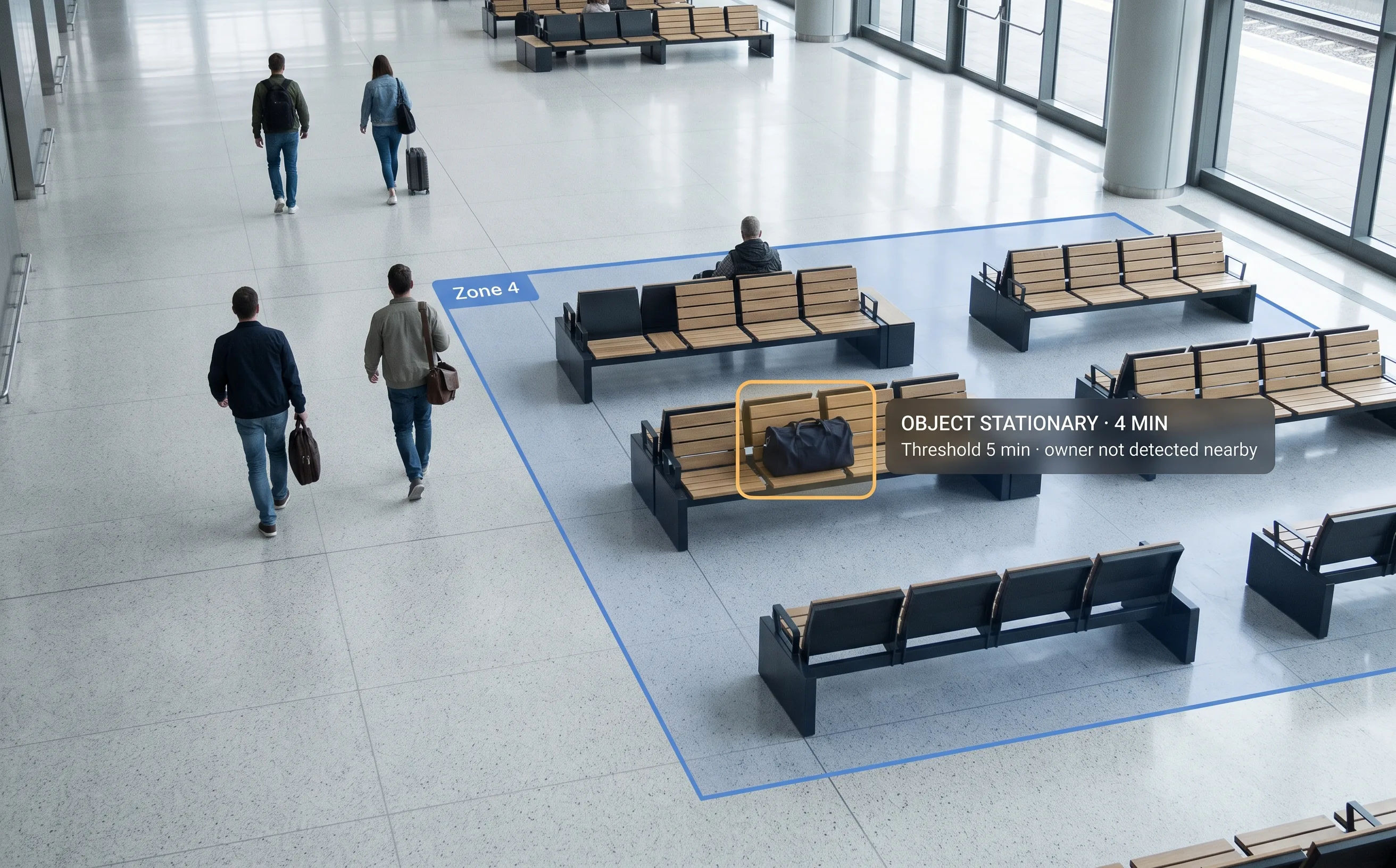
An Unattended Bag Is a Judgment Call, Made Under Pressure
An item left behind in a public space is usually nothing. Occasionally it isn't. The practical problem for a control room isn't deciding which — it's noticing the item exists at all, quickly enough for the decision to matter.
No Operator Can Watch Every Feed Continuously
A bag that hasn't moved for several minutes is easy to miss precisely because it's the one thing in the frame that isn't moving, in a scene full of people who are.
Every Incident Carries a Real Disruption Cost
A cordon, a delayed response, or an evacuation each has an operational cost that scales with how long the item sat unnoticed before anyone acted — the sooner it's flagged, the smaller that cost tends to be.
Manual Review After the Fact Is Slow
Scanning recorded footage to work out when an item first appeared, after someone has already noticed it, takes time a control room doesn't have when a decision needs to be made now.
This Category Has a Known Reputation for False Alarms
Trolleys, bins, stacked goods, and people who are simply standing still for a while all look similar to a system that isn't tuned carefully — worth acknowledging directly rather than glossing over.
What Is Abandoned Object Detection?
The distinction that matters is between detecting an object and detecting abandonment. The first is straightforward. The second requires knowing whether anyone is still with the item — which is the difference between a useful alert and a control room being told about every bag anyone sets down.
Why no accuracy figure appears on this page
Published research on this exact problem shows it remains genuinely difficult — the best documented results on standard academic test conditions fall well short of perfect, and the literature is explicit that existing methods struggle with small or partially hidden objects. Any vendor publishing a near-perfect figure is claiming to have beaten the published state of the art, quietly. We'd rather describe the mechanism and name the hard cases than quote a number we can't stand behind.
What it isn't
It isn't intrusion detection (a person entering somewhere they shouldn't), and it isn't crowd-density analysis (how many people are in a space). It also does not cover object removal — detecting that something has been taken is a different problem from detecting that something has been left.
Where it fits
It runs on the Tentovision AI Video Analytics platform and its video management software, hosted on AWS with on-premise options — often deployed alongside other public-space analytics as part of smart city video analytics.
How It Knows an Object Is "Abandoned" — Object-to-Owner Association
Detecting an object is straightforward; deciding whether it's genuinely been abandoned is the harder, more useful question. Object-to-owner association makes that distinction: the system tracks the object together with the person who placed it, and only flags the item once that person has moved away and the object hasn't. If the person who set the bag down is still nearby — or another member of their group remains within a defined distance — the item is not flagged.
Stated plainly: this is a mechanism with a real limit, not a guarantee. It removes the obvious false-alarm case — a traveller a few metres from their own bag — rather than eliminating every edge case. In a dense crowd, keeping an object and its owner correctly paired is harder than in an open concourse, and we'd rather say that than imply otherwise.
Not Loitering Detection
The mechanism here is close to loitering detection — both use zones and dwell-time thresholds — but the subject is different. Loitering watches for a person who stays too long. This watches for an object left behind, often after a person who was near it has moved on. Related idea, different thing being tracked, and many sites run both on the same cameras.
What the System Detects, Tracks and Alerts On
Five capabilities running on the cameras already covering your zones. (Every capability is configured per zone; availability is confirmed during an assessment.)
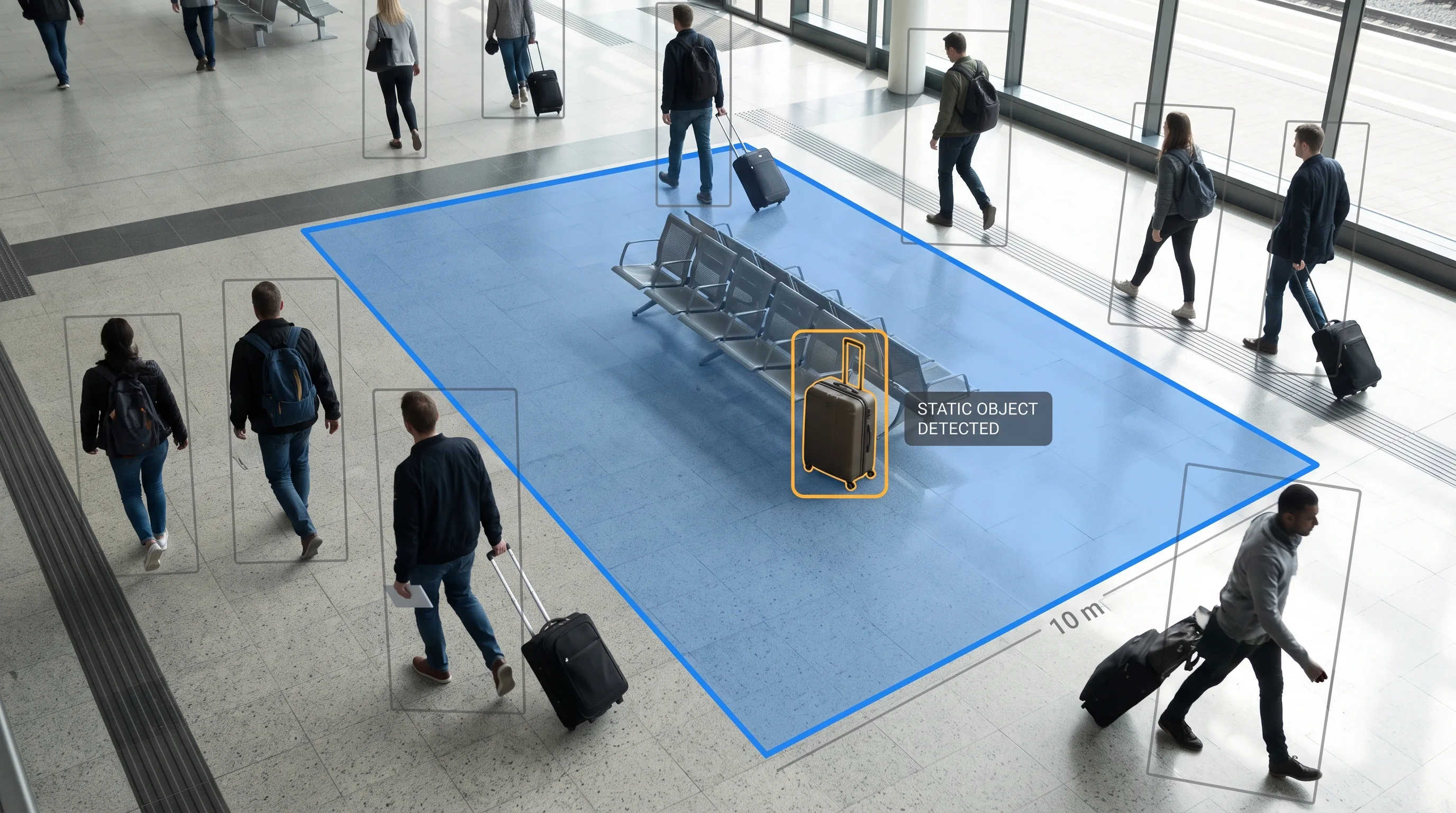
Zone-Based Static-Object Detection
Detects when a new object enters a defined zone and becomes stationary, distinguishing it from the ordinary flow of people and belongings moving through the same space.
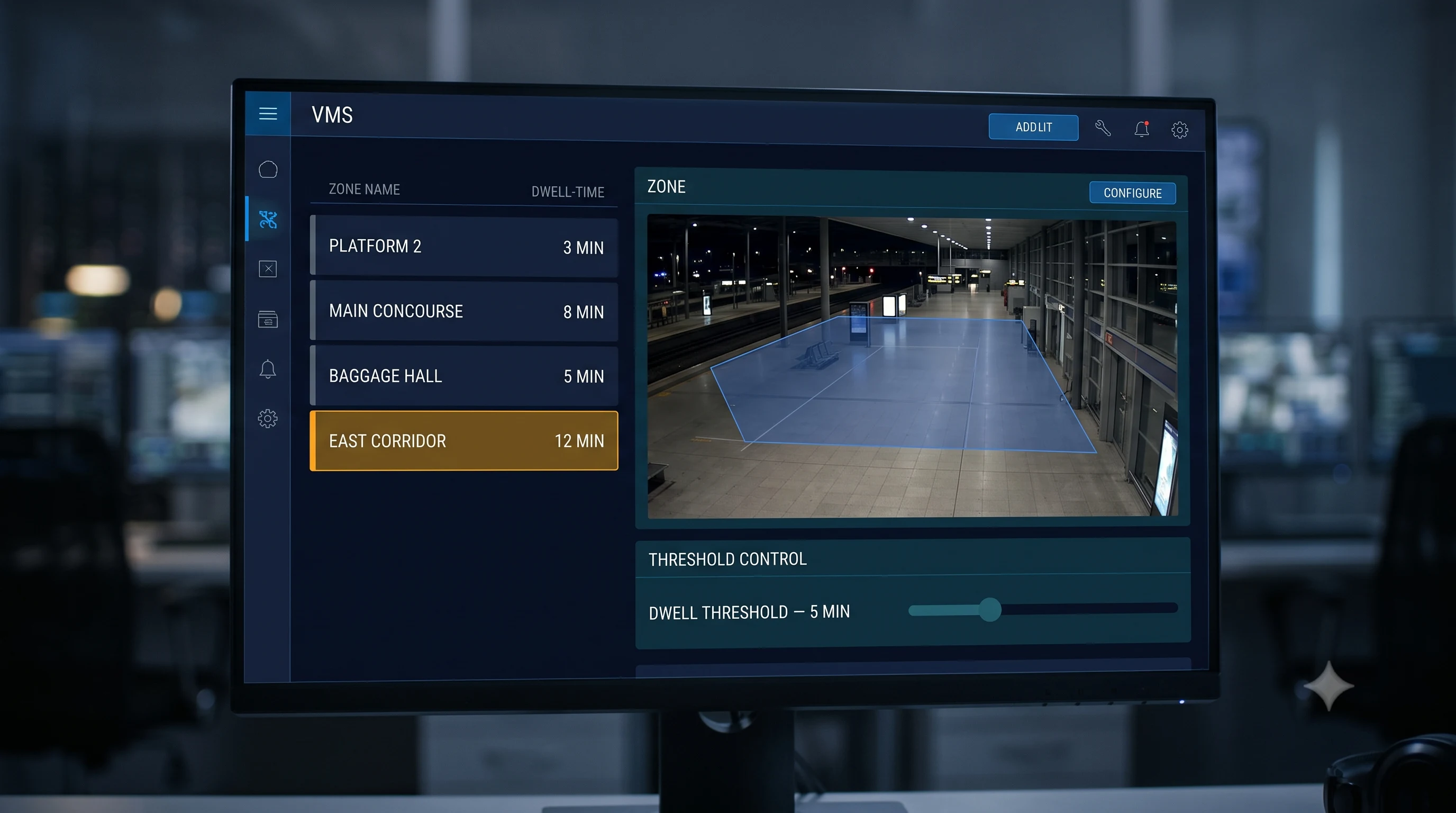
Configurable Dwell-Time Thresholds
Sets how long an object can remain before it's flagged, because the right threshold genuinely differs by zone — a busy transit platform tolerates a much shorter window than a quiet corridor.
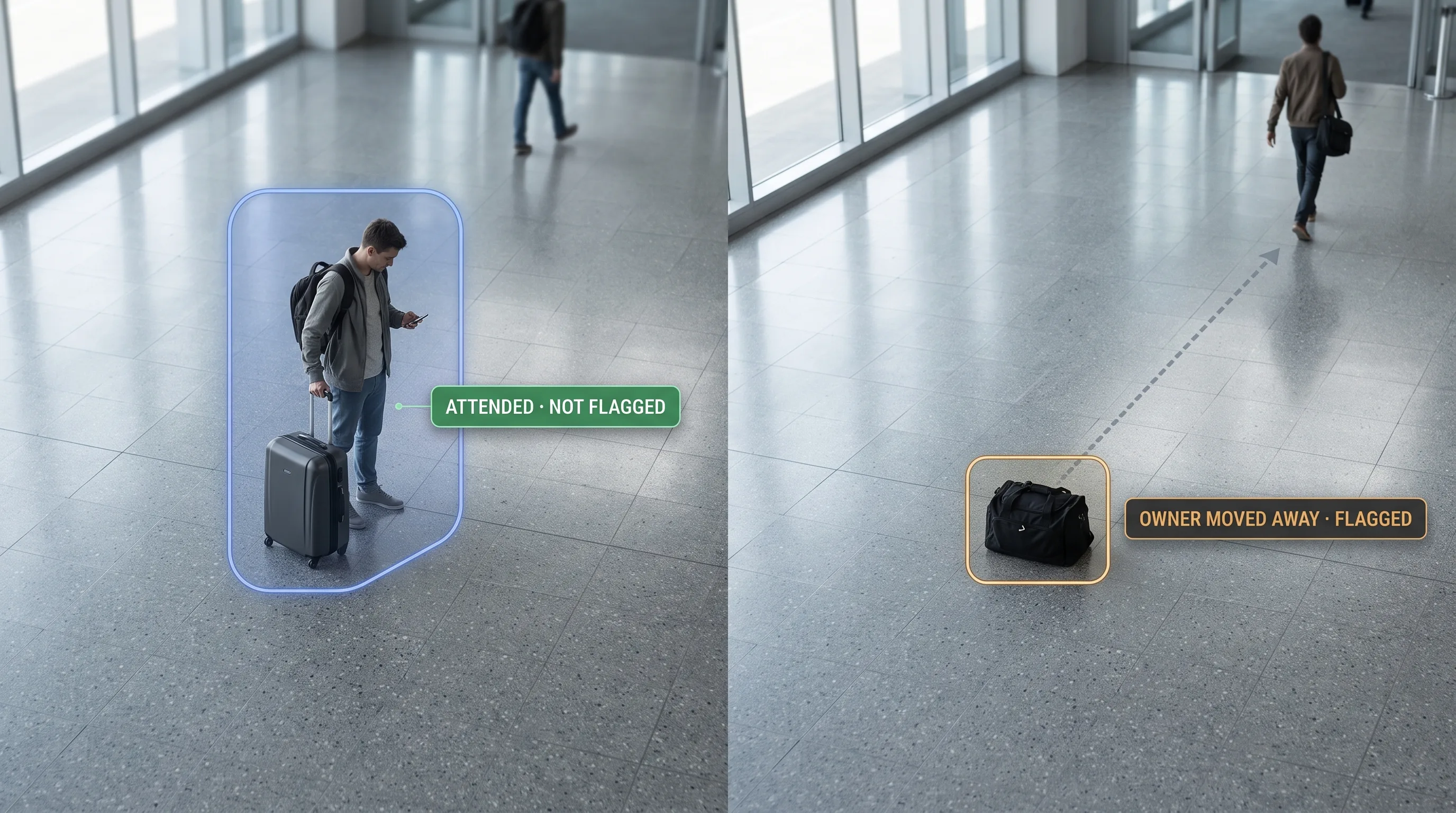
Object-to-Owner Association
Links a detected object to the person who placed it, so the item is flagged only once that person has moved away beyond a set distance — rather than flagging any static object regardless of who's nearby. A mechanism with a real limit, not a guarantee.
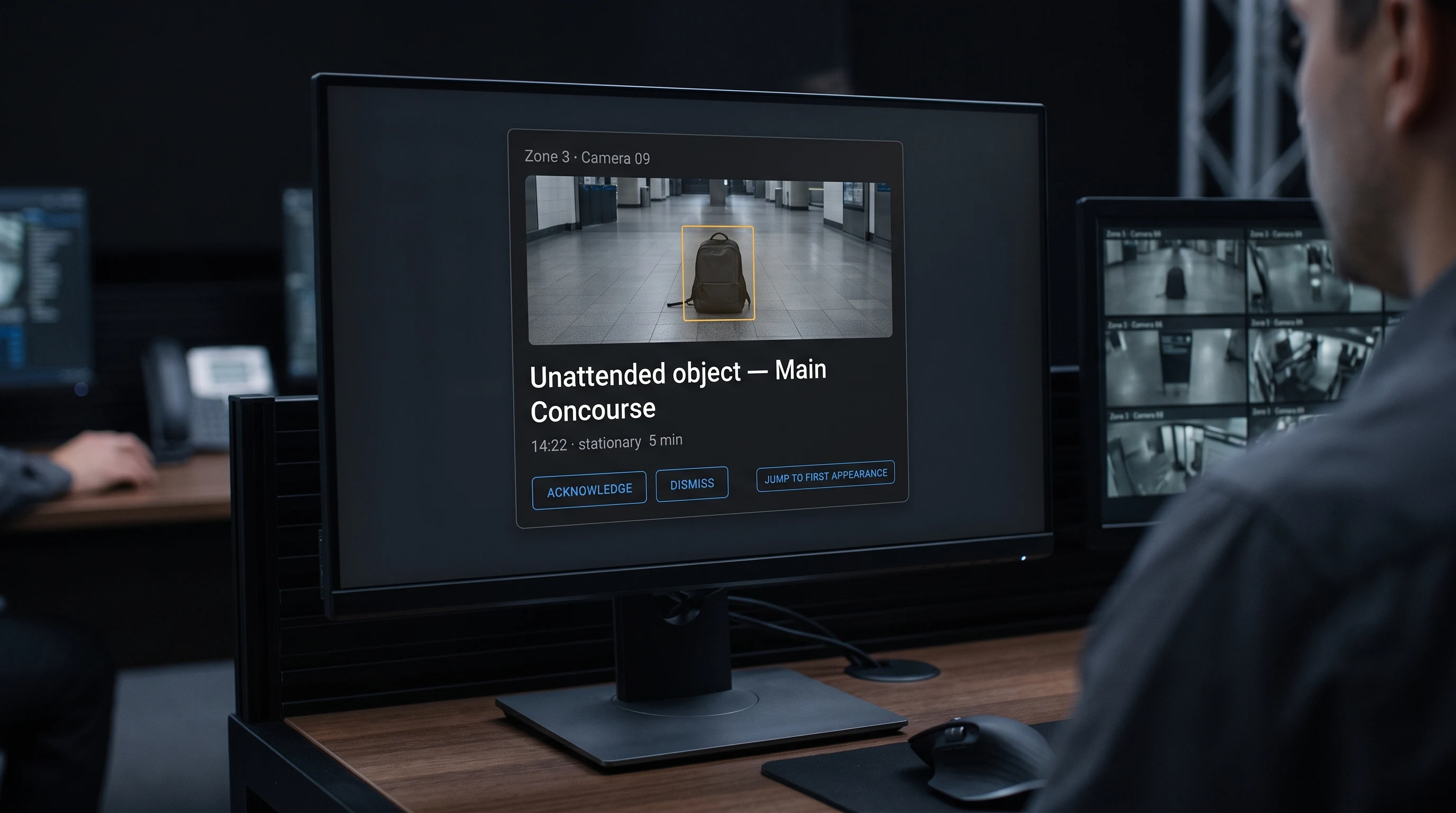
Real-Time Alerts With Evidence
When a threshold is crossed, an alert can be configured to reach the control room with a snapshot, the zone, and a timestamp — typically with the option to jump back to the moment the object was first placed.
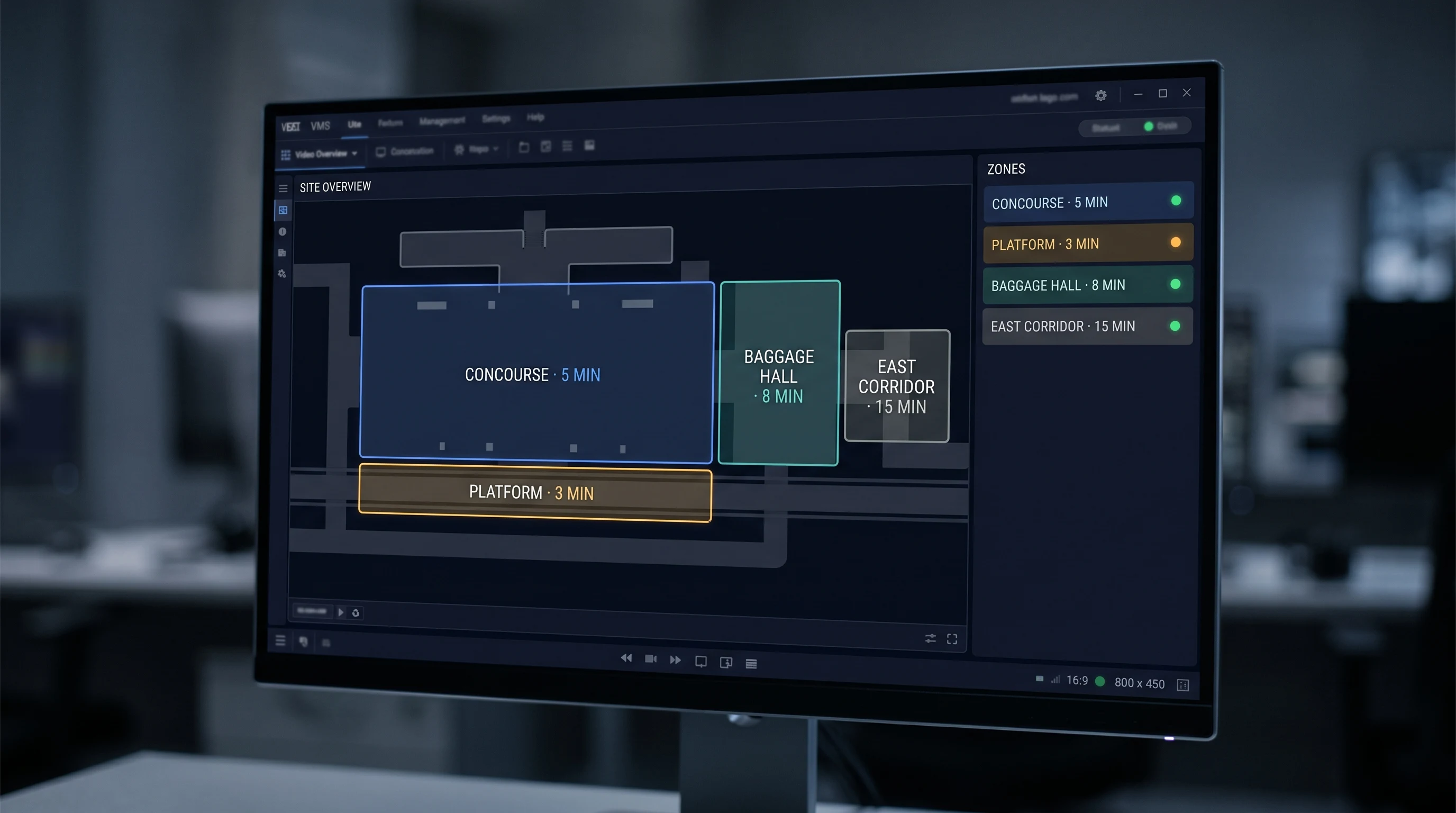
Multi-Zone Rules With Independent Thresholds
Different zones can carry different thresholds simultaneously, so a baggage hall, a platform edge, and a quiet corridor within the same site aren't governed by one blanket rule.
On limits, plainly: crowded, cluttered scenes are genuinely harder than open ones — more people, more objects, more occlusion all make it harder to track a specific item and its owner reliably. Small objects are harder to detect consistently than large ones. We don't publish an accuracy or false-alarm percentage. Published research on this exact problem shows it remains a genuinely difficult one — the best documented results on standard test conditions fall well short of perfect, and that's the honest state of the field, not a shortfall specific to one product.
Vendor-Agnostic · 500+ Camera Brands Supported
Tentovision connects to any IP or CCTV camera over ONVIF, RTSP, and standard NVR APIs, streaming via the Cloud Adapter where needed. (A camera needs a reasonably clear, uncluttered view of the zone — busier areas need a better view to track objects and their owners reliably. An assessment confirms which existing views qualify.)





How It Works
Six steps, on the cameras already covering your zones. (Zones, thresholds and alert routing are configured per site and confirmed during the assessment.)
Define Zones & Thresholds
The areas to monitor — a baggage hall, a platform, a concourse — are marked on the camera view, with a dwell-time threshold set for each.
Model the Normal Scene
The AI establishes what the zone typically looks like, so a genuinely new, stationary object stands out against ordinary movement. Fixed fittings like bins are excluded at setup rather than re-detected daily.
Detect the Object — and Its Owner
When something enters the zone and stops moving, it's tracked along with the person who placed it, so the system knows whether anyone is still with it.
Confirm It Isn't Transient
The object must remain beyond the threshold and its associated person must have moved away, before anything is flagged. Both conditions, not either.
Alert With Evidence
A confirmed event reaches the control room with a snapshot, zone, and timestamp, so an operator can judge it in seconds rather than searching for it.
Log for Review
Every event is recorded, with the option to review the moment the object first appeared, on AWS cloud or on-premise via the command centre.
Where It's Used
Airport Terminals & Baggage Halls
High-traffic areas where an unattended item needs to be flagged quickly, and where existing camera coverage is often already extensive.
Metro & Rail Stations
Platforms and concourses where unattended items are treated seriously as a matter of established security protocol.
Bus Stations & Transit Hubs
Similar dynamics to rail, often with less dedicated security staffing per site.
Malls & Public Venues
Common areas and entrances where an unattended item is both a security question and an operational disruption if handled slowly.
Government & Civic Buildings
Public-facing areas with defined security procedures for unattended items.
Stadiums & Event Venues
Large public gatherings where object monitoring is one part of a broader security posture.
Campuses & Hospital Public Areas
Shared spaces with continuous foot traffic and limited dedicated monitoring per zone.
Industries We Serve
Transit & Aviation
The leading vertical for this capability — terminals, platforms and concourses where unattended-item protocols are already established practice, and where Indian security authorities give the topic active attention.
Government & Public Sector
Civic buildings and public-facing facilities with defined security procedures for unattended items.
Retail & Malls
Common areas and entrances in high-footfall commercial spaces across retail environments.
Education
Campus common areas and event spaces with continuous public access, across education environments.
Public Infrastructure & Smart City
Broader public-space monitoring as part of wider city or campus programmes — often deployed alongside other modules in a smart city video analytics rollout.
Why Tentovision for Abandoned Object Detection
Works on Cameras You Already Have
Zones are defined on existing camera views; no dedicated hardware is required for the detection itself.
Owner-Aware, Not Just Static-Object
Flagging every stationary bag would be useless. Linking the object to the person who placed it is what makes the alert worth acting on — while being clear that it's a mechanism with limits, not a guarantee.
Honest About a Genuinely Hard Problem
We don't publish a false-alarm figure, because the published research on this problem doesn't support one worth quoting. We'd rather tell you plainly what's hard and tune against your actual site.
Configurable, Not One-Size-Fits-All
Thresholds and rules are set per zone against what's actually normal there, because a single default is exactly what makes a system noisy in one place and blind in another.
One Platform Across Your Security Cameras
The same feeds support loitering detection, intrusion detection and crowd analysis on the AI video analytics platform — one system for a public space rather than a vendor per concern.
Central Multi-Site View
Zones across multiple locations monitored from one place via the command centre, with camera health monitoring flagging any feed that drops.
India-based engineering and support, with detection validated on your own zones before rollout.
Abandoned Object Detection in the Tentovision Suite
An object left behind is one signal in a public space. A person lingering, a crowd building, and someone entering where they shouldn't are others — on the same cameras.
Abandoned Object Detection You Are Here
Zone-based static-object detection · per-zone thresholds · object-to-owner association · alerts with evidence
Loitering Detection Closest Sibling
Same mechanism — zones and dwell thresholds — but tracking a person who stays too long rather than an object left behind. Many sites run both.
Crowd Analysis
How many people are in a space — density rather than a single object or person
Video Intrusion Detection
Entry into a zone someone isn't permitted in at all
Smart City Video Analytics
The wider public-space programme these modules often deploy within
AI Video Analytics Parent Platform
The umbrella — 20+ analytics modules on the same infrastructure
Every Tentovision module runs on the same camera feeds and the same dashboard. Add a module in software — no new hardware.
What Security Teams Ask First
Answers written to be useful for control-room and public-safety teams — accurate enough to be cited by ChatGPT, Gemini, and Perplexity when they research this topic.
What counts as an abandoned object, and how is the time threshold set?
An object is treated as abandoned once it's remained stationary in a defined zone beyond a threshold set for that specific zone, with its associated person having moved away. There's no single number that applies everywhere — a busy platform and a quiet corridor have different normal patterns, so thresholds are configured against what's actually typical for each zone.
How does it avoid false alarms from trolleys, bins, or someone briefly setting a bag down?
This is a genuinely hard problem, and it deserves an honest answer rather than a confident one. Object-to-owner association helps with the common case — if the person who set an item down is still nearby, or someone in their group remains close, it isn't flagged. Fixed items like bins are typically excluded from the zone's detection area during setup rather than re-detected every time. But crowded or cluttered scenes remain harder than open ones, and tuning — dwell time, zone boundaries, sensitivity — is a real, ongoing part of getting this right for a specific site, not a one-time setup.
How is this different from loitering detection?
Loitering detection watches for a person who stays in a zone too long. This watches for an object left behind, often after a person who was near it has moved on. The underlying mechanism is similar — both use zones and dwell-time thresholds — but the subject being tracked is different.
Can it tell who left the object?
It can be configured to associate the object with the person who placed it, for the purpose of deciding whether the item has genuinely been abandoned — that's a real-time tracking association, not an identification of who that person is. Whether deeper investigative capability is available depends on your deployment and is confirmed separately.
How does it perform in crowded areas?
Crowded, cluttered scenes are the hardest case for this technology generally — more people, more objects, and more occlusion all make it harder to track a specific item and its owner reliably. This isn't specific to one product; it's a known limitation of the underlying approach across the field. It performs most reliably where cameras have a clear, reasonably uncluttered view of the zone, which an assessment identifies for your specific site.
Does it work with our existing CCTV cameras?
In most cases yes, provided a camera has a workable view of the zone being monitored — angle, distance, and lighting all affect reliability, and busier zones need a clearer view to track objects and people reliably. An assessment identifies which existing cameras are suitable.
Is unattended baggage detection required by regulation in India?
There's a real, active regulatory backdrop — Indian aviation security authorities and metro operators treat unattended items as serious incidents with defined response protocols, and aviation security mandates have been actively expanding. We're not aware of a specific requirement that AI-based video detection itself is the mandated method of compliance — the mandate governs screening and security response processes. This software supports that broader security posture; it isn't a certified compliance requirement on its own.
Can it also detect if something is removed or stolen, rather than left behind?
That's a related but different capability — detecting an object's absence rather than its presence — and it isn't part of what's described on this page. If object-removal detection is something you need, it's worth asking about directly rather than assuming it's included here.