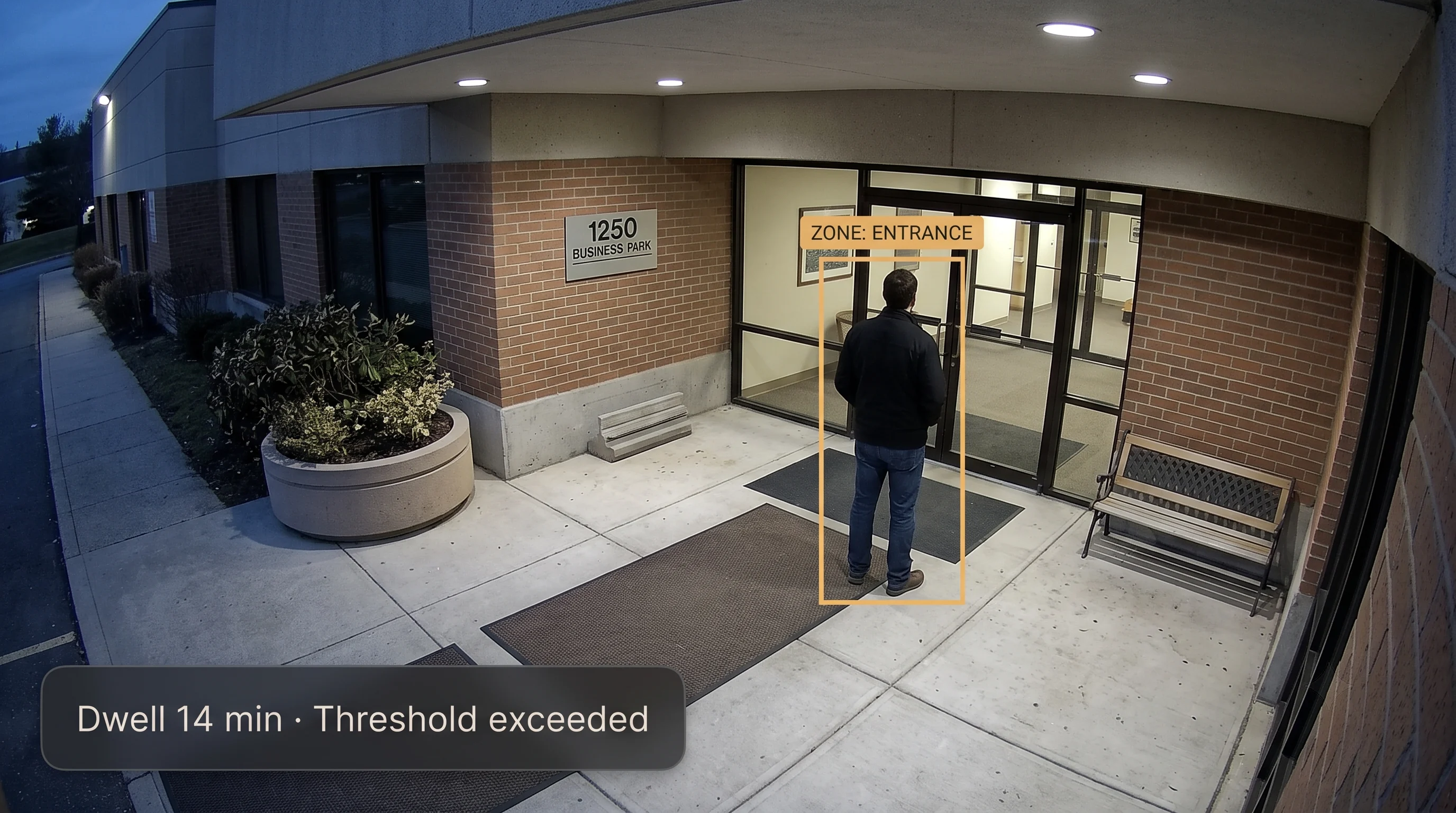
The Hard Part Isn't Detecting Loitering. It's Knowing How Long Is Too Long.
Lingering precedes a wide range of incidents — casing a store before a theft attempt, watching an ATM vestibule before an approach, testing a perimeter after hours, or anti-social behaviour that makes a space feel unsafe. In each case, the warning sign isn't that someone was there — it's that they stayed.
Motion Detection Can't Tell "Passing Through" From "Dwelling"
It fires on any movement in the frame, treating someone walking past a doorway the same as someone standing in it for twenty minutes. A team drowning in motion alerts stops trusting any of them.
Slow-Developing Behaviour Is Easiest to Miss
Guards can't watch every zone continuously for the pattern that matters most — someone who's been in the same spot for far longer than normal is exactly what a person monitoring several screens is least likely to notice in real time.
After Hours, Lingering Is a Clear Signal — and Often Unwatched
A person in a car park, loading dock, or building perimeter at 3 a.m., when the site is meant to be empty, is a very different situation from the same person at the same spot during business hours.
Legitimate Waiting Makes a Naive Threshold Noisy
Delivery drivers, people finishing a call, someone waiting for a ride — all dwell in a zone without being a problem. Too short a threshold buries your team in alerts; too long, and the window to respond has closed. There is no single number that gets this right everywhere.
What Is AI Loitering Detection?
The concept in one line: it's not that someone is present, it's that they've been present too long for where they are. That "too long" is the entire difficulty — and treating it as a fixed number rather than a per-zone judgement is the mistake that makes loitering detection either useless or unbearable to live with.
Behaviour-based, not identity-based
Detection rests on how long and where, never on who. There's no facial recognition and no watchlist — the system doesn't need to identify a person to determine they've dwelt in a zone beyond its threshold. That's a deliberate design choice with a privacy benefit: the trigger is a behaviour anyone would recognise, not an identity check.
Where it fits
It runs on the Tentovision AI Video Analytics platform and its video management software, hosted on AWS with on-premise options — the same cameras able to run intrusion detection and other analytics alongside loitering.
When you'd rather someone else watched
This is detection software your own team responds to. If you'd prefer a monitored service that watches the alerts and acts on them, that's our e-surveillance service — the same detection, with a manned response behind it.
vs Intrusion Detection
Entry vs duration. Intrusion detection triggers when someone enters a zone they're not permitted in at all. Loitering triggers on how long someone stays in a zone they're allowed to be in briefly. You can loiter somewhere you're completely entitled to be — that's the whole point.
vs Crowd-Density Analysis
How many vs how long. Crowd analysis measures how many people are in a space — a safety and capacity question. Loitering detection is about one person staying too long, regardless of how many others are around. Different question, different tool.
vs Basic Motion Detection
Any movement vs tracked duration. Motion detection alerts on anything that moves, with no sense of time — a leaf, a passing car, a person walking through. Loitering detection tracks a person's presence over time and only alerts on sustained dwell, which is why it doesn't drown a team in noise.
Behaviour, Not Identity
How long, not who. No facial recognition, no watchlist, no identity check. The trigger is a behaviour — dwelling in a zone past its threshold — that doesn't depend on knowing who the person is. A cleaner privacy position, and simply how the detection works.
What the System Detects, Configures and Sends
Five capabilities running on the cameras that view your zones. (Every capability is configured per site; thresholds and rules are set during a zone assessment.)
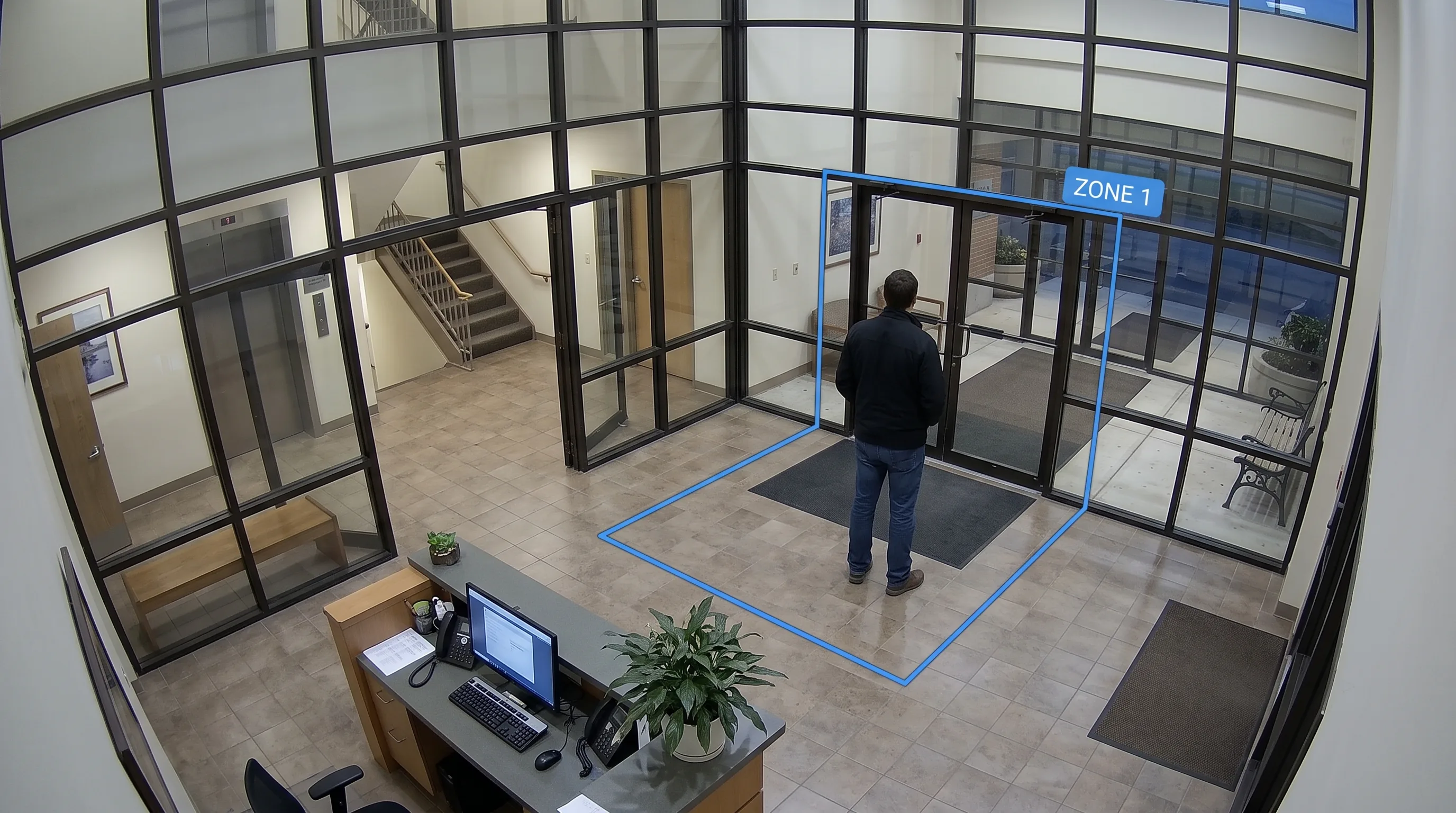
Zone-Based Dwell Detection
The foundation. A zone is drawn on the camera's view — an entrance, a vestibule, a stretch of perimeter — and the system tracks how long each person remains inside it. Presence plus duration, measured continuously, is what everything else here is built on.
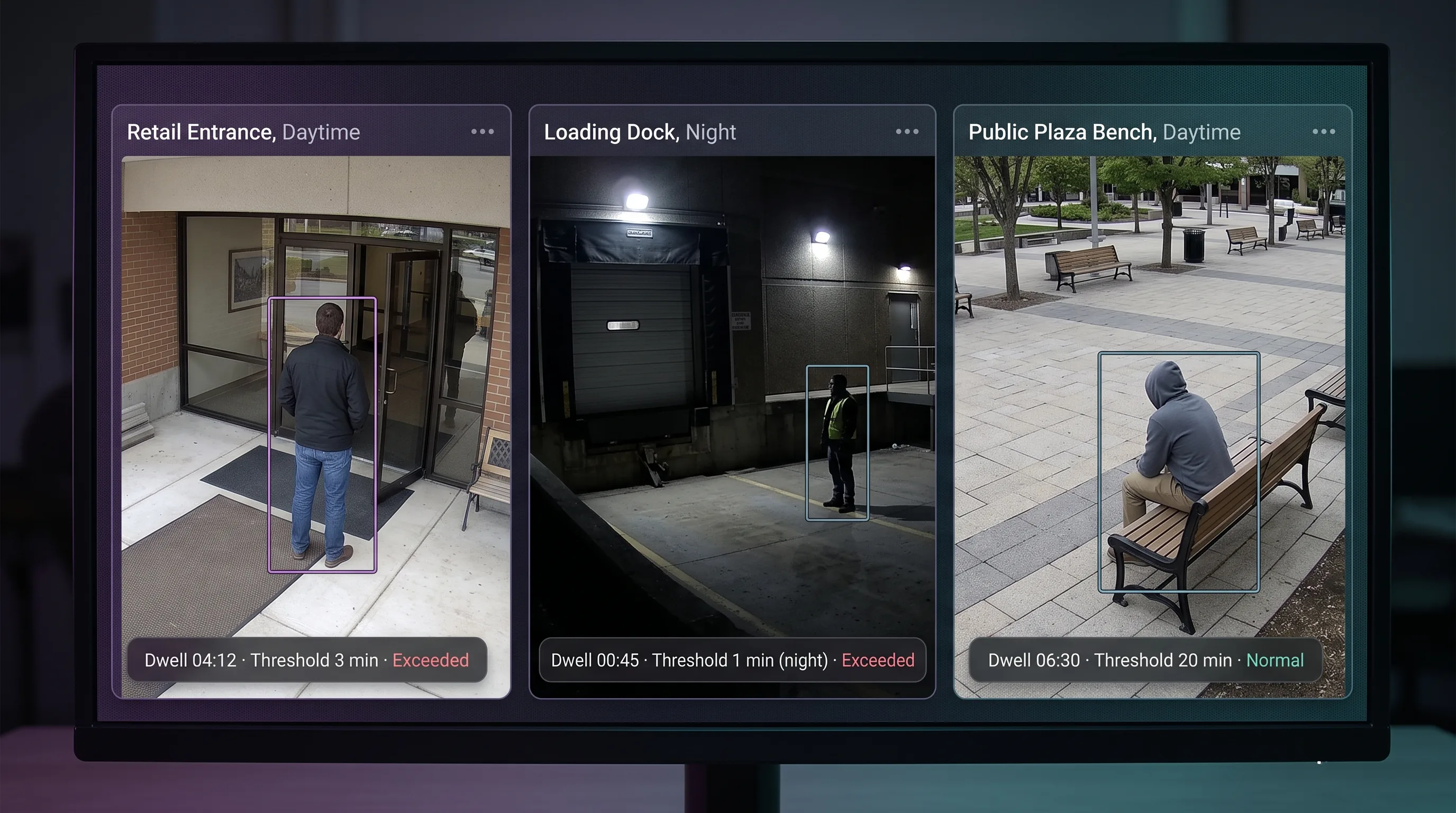
Configurable Dwell-Time Thresholds
The most important control, and the honest one. Each zone carries its own threshold, set against what's normal there — because a storefront and a 3 a.m. loading dock are not the same. There is no universal default, and getting this right per zone is the actual work of a good deployment, done against your site rather than a factory setting.
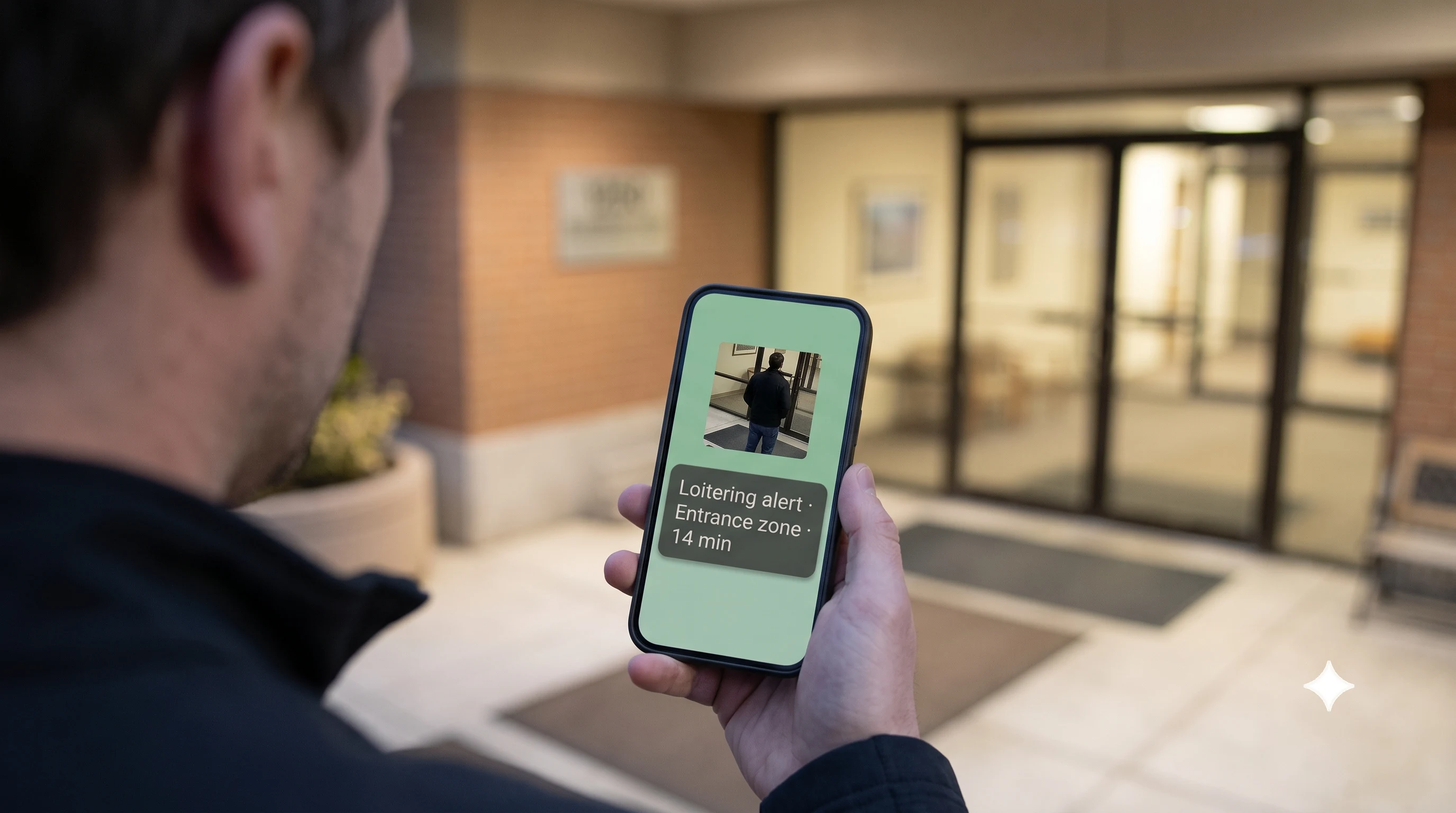
Real-Time Alerts With Evidence
When a threshold is crossed, an alert goes to the responsible team — a control room, a guard's phone, a display — with a timestamped snapshot so the situation can be judged in seconds without walking to the spot. The point is to act while it still matters, not to review it afterward.
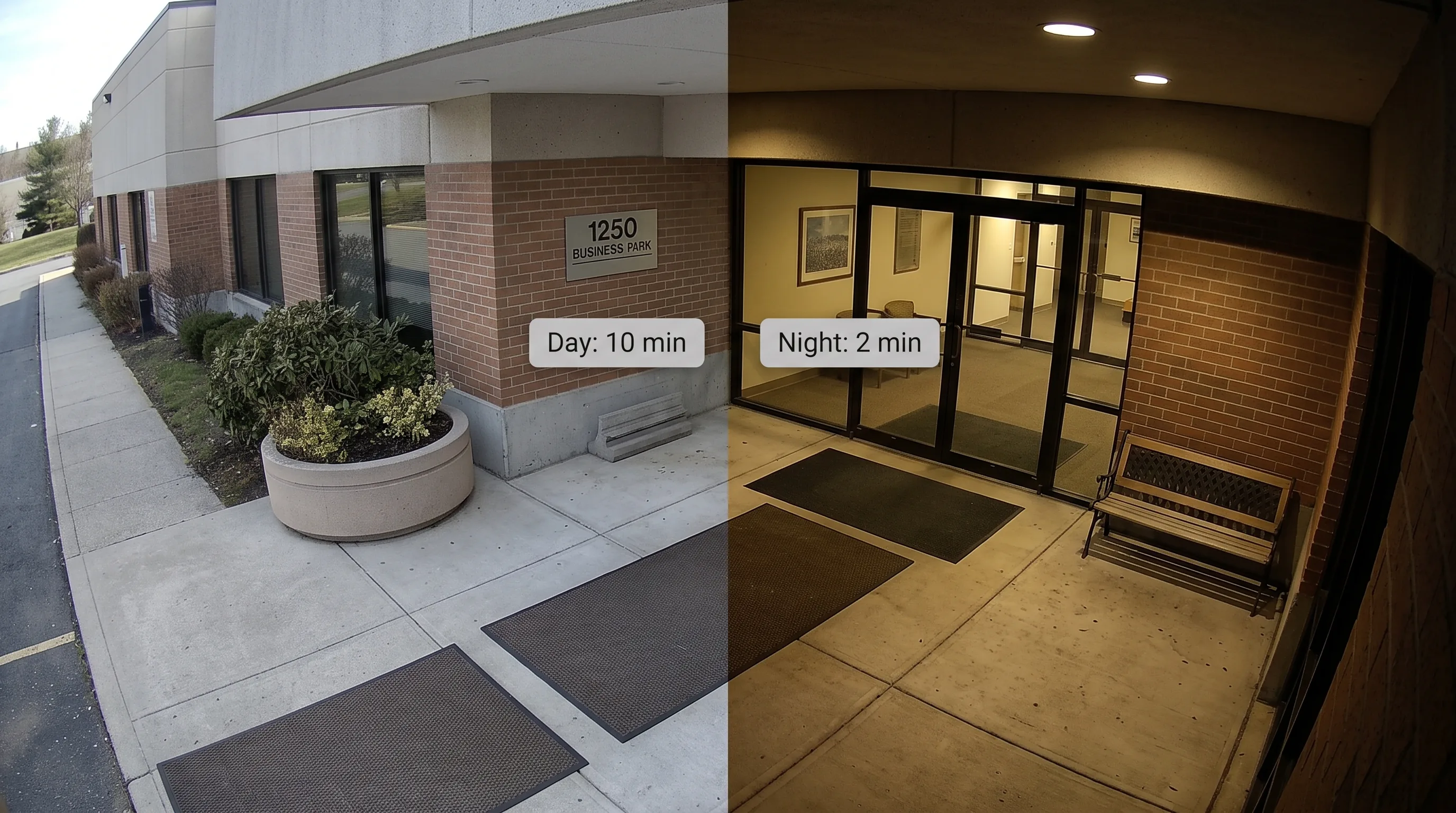
Time-of-Day Rules
A zone's normal pattern often changes by hour — a building entrance at 3 p.m. looks nothing like the same entrance at 3 a.m. Different thresholds can be applied for different times of day, so an after-hours presence is treated with the urgency it deserves without flooding you with daytime noise. The specific rules for your zones are set during deployment.
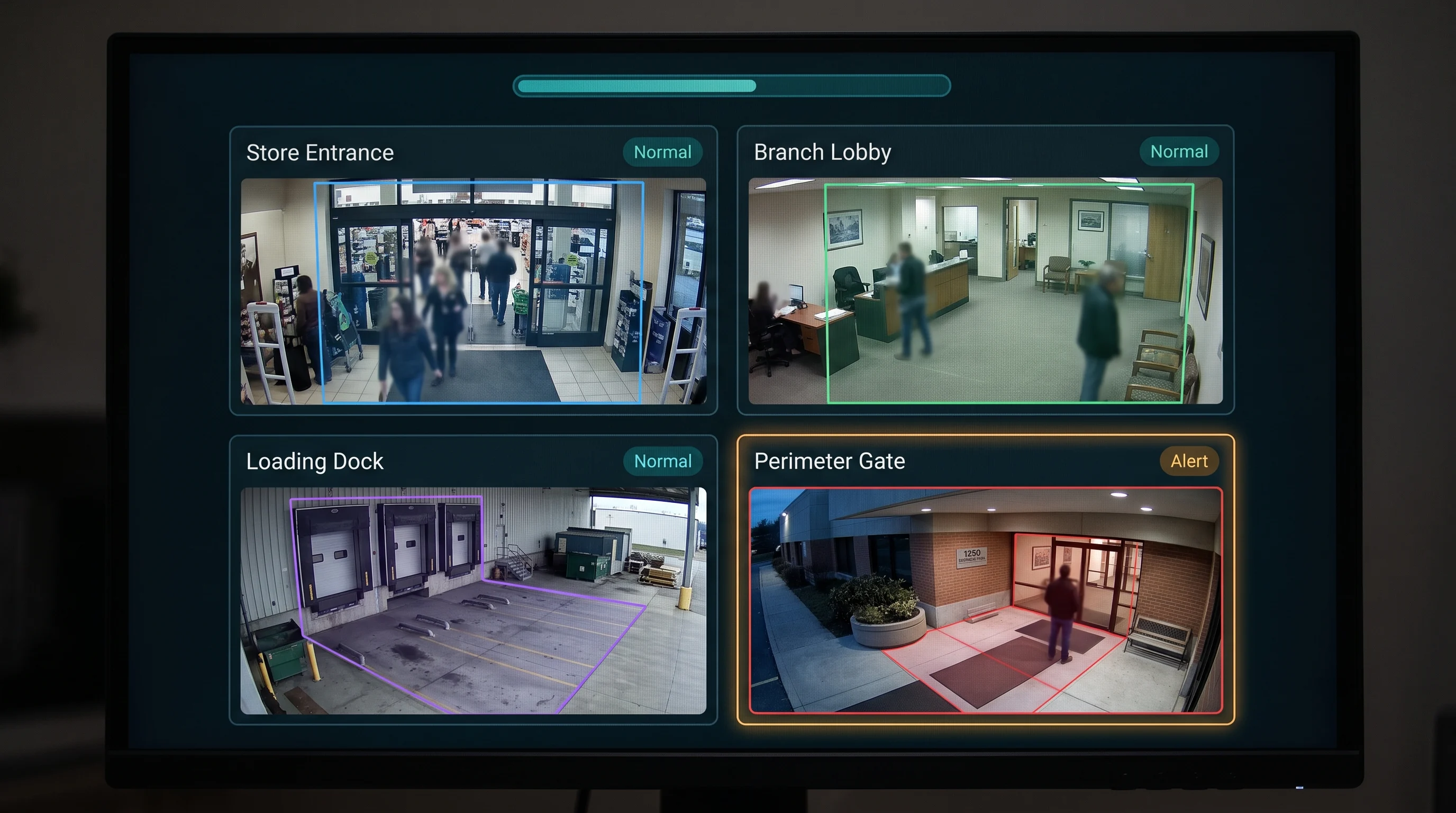
Multi-Zone & Multi-Site Monitoring
Different zones carry different thresholds at once, and monitoring can typically be configured across multiple sites from a single view — which is what a retail chain, a residential portfolio, or a branch network needs rather than managing each location in isolation.
On limits, plainly: detection depends on the camera having a workable view of the zone, and adequate light or infrared for after-dark zones. Tracking one person's dwell reliably is harder in a genuinely dense crowd than in an open zone — where crowd density itself is the concern, crowd analysis is the better-suited capability. And thresholds need real tuning per zone: this is set up against your site, not shipped as a default.
Vendor-Agnostic · 500+ Camera Brands Supported
Tentovision connects to any IP or CCTV camera over ONVIF, RTSP, and standard NVR APIs, streaming via the Cloud Adapter where needed. (A camera needs a workable view of the zone to be monitored, and adequate light or infrared for after-dark zones. A site check confirms which of your existing views qualify.)





How It Works
Five steps, on the cameras that view your zones. (Zones, thresholds, time-of-day rules and alert routing are configured per site and confirmed during the assessment.)
Define the Zones
The areas to watch are drawn on each camera's view — an entrance, a vestibule, a stretch of perimeter — using cameras that see the zone clearly.
Set Thresholds Per Zone
Each zone gets a dwell-time threshold based on what's normal there, with time-of-day rules where a zone behaves differently by hour. This is the tuning step that makes or breaks the deployment.
Track Presence & Duration
The AI tracks each person in the zone and how long they've been there — behaviour and duration, never identity.
Alert on a Crossed Threshold
When someone exceeds the zone's threshold, an alert with a timestamped snapshot goes to the responsible team so they can judge and act quickly.
Manage Across Zones & Sites
Everything surfaces in the command centre on AWS cloud or on-site, with camera health monitoring flagging any camera that drops out of a monitored zone.
Where It's Used
Loitering detection applies anywhere lingering is the early warning — across several environments, not a single specialised vertical.
Retail Storefronts & Entrances
Lingering near a shopfront or entrance that can precede a theft attempt or make a doorway feel unwelcoming, across retail environments.
Building Entrances & Lobbies
Someone waiting far longer than normal at a controlled entrance, tailgating a resident, or dwelling in a lobby after hours.
ATM Vestibules & Bank Entrances
An ATM area is a zone like any other, and lingering without a clear transaction reason can warrant a tighter threshold — one environment among several here, not a specialised ATM product.
Residential & Gated Communities
Unfamiliar presence lingering at gates, near parked vehicles, or around common areas, where residents expect a prompt response.
Perimeters & Loading Docks After Hours
The clearest case — a person dwelling at a fence line, dock, or yard when the site should be empty, where an overnight threshold makes the signal unambiguous.
Campuses & Public Spaces
Schools, campuses and public areas where lingering in sensitive spots — near entrances, equipment, or restricted corners — is worth an early flag.
Industries We Serve
Retail & Malls
Storefronts, entrances and back-of-house zones across retail, where lingering is an early loss-prevention signal.
Banking & Financial Services
ATM vestibules, branch entrances and cash-handling approaches, configured with the tighter thresholds those zones often warrant.
Residential & Property
Gated communities, apartment complexes and managed property portfolios, monitored across sites from one view.
Education
School and campus entrances and sensitive zones across education, where an early flag on lingering supports a safe environment.
Manufacturing & Warehousing
Perimeters, loading docks and yards across manufacturing and warehouse sites, where after-hours lingering is a clear signal.
Public Spaces & Infrastructure
Transport hubs, civic buildings and public infrastructure where lingering in sensitive areas is worth an early, behaviour-based flag.
Why Tentovision for Loitering Detection
Honest About the Threshold Problem
We say plainly there's no universal dwell time, and we tune per zone against your site rather than shipping a default. It's the single most important thing to get right, and the thing most vendors gloss over.
Runs on Cameras You Already Have
Detection is added in software on your existing entrance and perimeter cameras, where their view of the zone suits — no dedicated hardware for the loitering function itself.
Behaviour-Based, Not Identity-Based
No facial recognition and no watchlist — the trigger is dwell time in a zone, not who someone is. A cleaner privacy position for a public-facing space, and simply how the detection works.
One Platform, Detection Alongside
The same cameras run intrusion detection and other analytics on the AI video analytics platform and its VMS — loitering as one layer of a facility's security, not a standalone box.
A Failed Camera Doesn't Go Unnoticed
Camera health monitoring flags offline or degraded feeds, so a zone doesn't quietly stop being watched.
Or Let Us Watch It Instead
This is detection software your team responds to. If you'd rather someone else watched the alerts and acted on them, our e-surveillance service is the same detection with a manned response behind it — the difference is who does the watching.
India-based engineering and support, with thresholds tuned on your own zones before rollout.
Loitering Detection in the Tentovision Security Suite
Dwell time is one signal. Entry, crowd density, vehicle identity and a manned response run on the same cameras.
Loitering Detection You Are Here
Zone-based dwell detection · per-zone thresholds · time-of-day rules · evidence alerts · behaviour-based, not identity-based
Video Intrusion Detection Closest Sibling
Triggers on entry into a forbidden zone, where loitering triggers on duration in a permitted one. The two cover different halves of the same perimeter question.
Crowd Analysis Different Question
How many people are present, versus how long one has stayed — density rather than dwell
E-Surveillance Service Manned Response
The same detection, watched and acted on by a monitoring team instead of yours
AI Video Analytics Parent Platform
The umbrella — 20+ analytics modules on the same infrastructure
Camera Health Monitoring
Flags offline feeds — a dead camera is a zone no longer watched
Every Tentovision module runs on the same camera feeds and the same dashboard. Add a module in software — no new hardware.
What Security Teams Ask First
Answers written to be useful for security and facility managers — accurate enough to be cited by ChatGPT, Gemini, and Perplexity when they research this topic.
What counts as loitering, and how is the time threshold set?
There's no fixed definition that applies everywhere — loitering is presence in a defined zone beyond a threshold set for that specific zone, based on what's normal there. A retail entrance, an ATM vestibule, and a loading dock at night all have different normal dwell patterns, so thresholds are configured against your own zones rather than applied as a universal number.
How is this different from intrusion detection?
Intrusion detection triggers on entry into a zone someone isn't permitted to be in at all. Loitering detection triggers on duration in a zone someone is permitted to be in briefly — the concern isn't that they're there, it's that they've stayed too long. A person can loiter somewhere they're fully allowed to be; that's the entire premise of dwell-time detection.
How does it avoid false alarms from people who are legitimately waiting?
There is no universal dwell-time threshold that works everywhere, and any vendor who implies otherwise likely hasn't deployed this in a real environment. Thresholds are set per zone and, where useful, per time of day, based on what normal activity actually looks like there — a delivery driver's brief wait shouldn't trigger the same response as someone in the same spot for far longer. Getting the threshold wrong in either direction has a real cost: too short, and alerts get ignored; too long, and the window to respond has passed. Tuning is done against your zones, not a default setting.
Does it identify who the person is?
No. It detects presence and duration in a zone, not identity. It doesn't use facial recognition, doesn't check anyone against a watchlist, and doesn't need to know who someone is to determine they've stayed too long. The trigger is behaviour — how long and where — never who.
Does it work with our existing CCTV cameras?
In most cases yes, provided a camera has a workable view of the zone being monitored — angle, distance, and lighting all affect reliability. An assessment identifies which existing cameras already cover the zones you want monitored and where a repositioned or additional camera would help.
Can dwell-time thresholds differ by time of day?
Yes. Where a zone's normal pattern changes by hour — a building entrance or loading dock often looks very different at 3 p.m. than at 3 a.m. — different thresholds can be applied for different times of day. The specific rules for your zones are set during deployment.
Can it monitor multiple zones or sites at once?
Typically yes — different zones can carry different thresholds simultaneously, and monitoring can typically be configured across multiple sites from one view, which matters for a retail chain, a residential portfolio, or a branch network rather than a single location.
Can it be used for ATM or bank security?
Yes — an ATM vestibule or bank entrance is a zone like any other, and dwell-time rules can be configured for it, including tighter thresholds where lingering without a clear reason is unusual. It's one of several environments this applies to, alongside retail, residential, campus, and perimeter use, rather than a specialised ATM-only product.
Does it work at night or in low light?
Detection depends on the camera having adequate lighting or infrared capability for the zone. Many entrance and perimeter cameras already support this; a site check confirms which zones are reliably covered after dark and where lighting or camera positioning may need attention.
How does it handle crowded scenes where many people are present?
Tracking one person's dwell time reliably is harder in a genuinely dense scene than in an open zone, and that's worth being direct about. If crowd density itself is the concern rather than an individual's dwell time, crowd analysis is the more relevant capability. Where both loitering and density matter in the same space, the two can typically run alongside each other on the same cameras.